Key Takeaways
· Group cam shows let multiple paying viewers enjoy a shared live webcam experience.
· Group show pricing varies between ticket-based, per-minute, and goal-based sessions.
· Joining a group cam show involves selecting a performer, reviewing costs, and purchasing access.
· Group shows offer shared interaction, while private cam shows provide more personalized attention.
· Understanding payment structures, privacy settings, and group chat etiquette helps create a better experience.
Every photo, comment, profile update, and online form can reveal more about you than you realize. Knowing what information you should never share online is one of the simplest ways to protect your identity, finances, and personal safety. Yet some of the most sensitive personal information you should never share online is hidden in everyday activities that seem completely harmless.
A birthday announcement, vacation photo, or friendly conversation with someone new can unintentionally expose details that scammers use to identify, locate, or impersonate you.
The good news? Protecting your privacy doesn't mean disappearing from the internet. It means understanding which details deserve protection, recognizing when someone is asking for too much, and making smarter decisions about what you share.
This guide explains exactly what to keep private, why it matters, and how to enjoy social media, online communities, and digital services without unnecessarily putting yourself at risk.
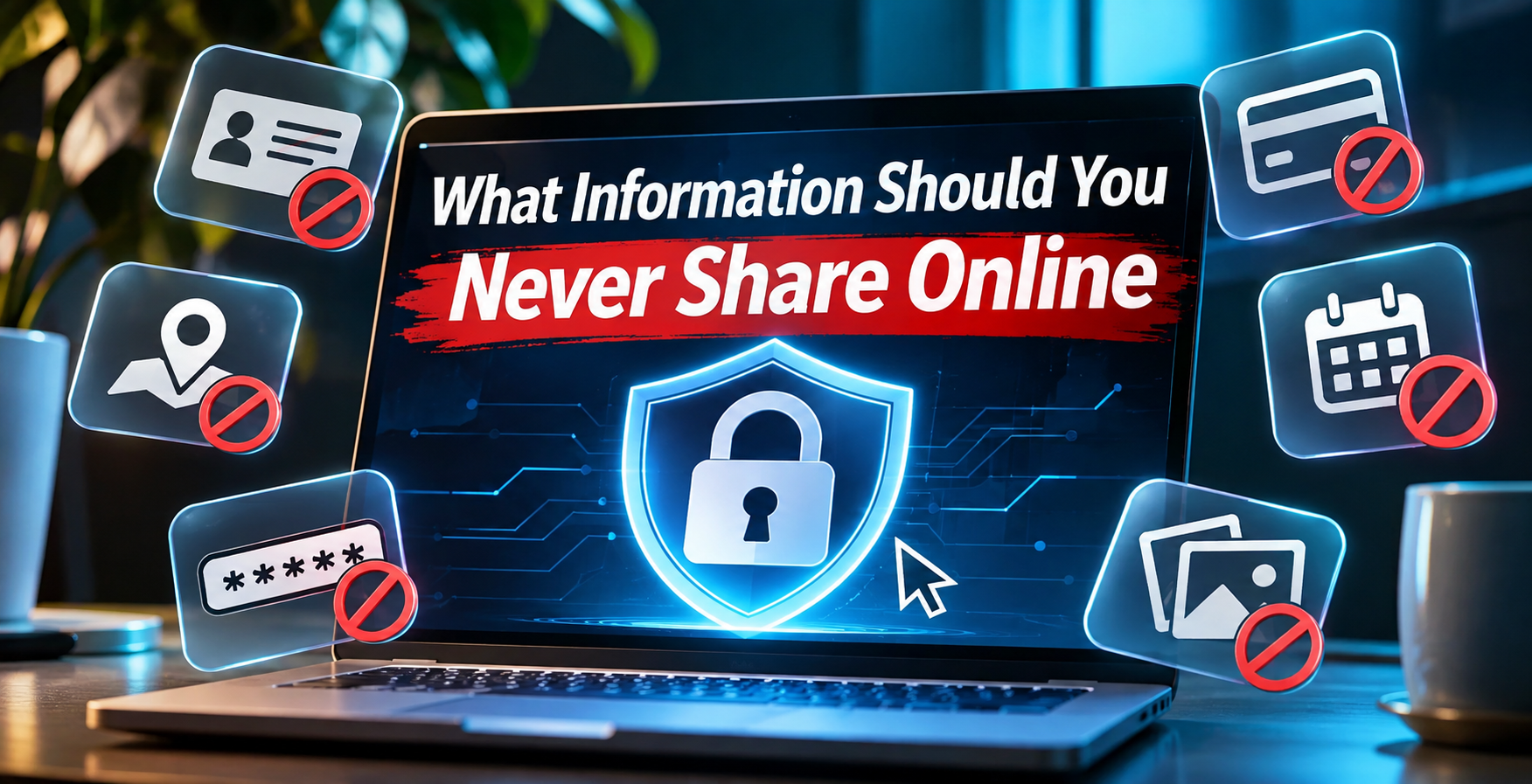
What Information Should You Never Share Online?
Some information is simply too valuable to expose publicly. Other details may be safe in one situation but dangerous when combined with information available elsewhere.
For example, sharing your first name with an online community is usually less risky than posting your full name alongside your home address, birthday, and workplace. Understanding this difference is essential to making better privacy decisions.
The most important information to keep private includes:
· Social Security numbers and government identification: Your Social Security number, passport number, driver's license number, and photographs of identification documents.
· Passwords and account access codes: Passwords, PINs, password reset links, authentication codes, and account recovery credentials.
· Financial information: Bank account numbers, credit card details, payment credentials, and sensitive financial statements.
· Your exact home address: Street address, apartment number, and other details that make your residence easy to identify.
· Your complete date of birth: Particularly when combined with your full legal name and other identifying information.
· Real-time location: Live location updates, travel itineraries, daily routines, and information revealing when your home is unoccupied.
· Medical and insurance information: Medical records, insurance identification numbers, prescriptions, and private health details.
· Private photographs and documents: Intimate images, confidential records, employment documents, and photographs containing sensitive information.
· Security question answers: Your mother's maiden name, childhood address, first pet's name, and similar information used to verify identity.
· Information about children and family members: School locations, schedules, identifying details, and information shared without their permission.
These details aren't all equally sensitive. A password or authentication code should never be disclosed to someone requesting it unexpectedly. An address or medical record may sometimes need to be provided to a legitimate organization through an appropriate, secure process.
The important distinction is between information that must remain confidential and information that should only be shared when necessary with a verified recipient.
What Is Personally Identifiable Information, and Why Does It Matter?
Personally identifiable information, commonly called PII, refers to information that can identify a particular individual, either directly or when combined with other available details.
Some examples are obvious, such as a passport number or Social Security number. Others are less apparent. Your email address, phone number, username, workplace, and location history may also help identify you, depending on the context.
Direct identifiers versus indirect identifiers
Direct identifiers can identify someone on their own or provide a strong connection to a specific person. Examples include certain government identification numbers, a full name in the appropriate context, or an account number linked to an individual.
Indirect identifiers may become identifying when combined. A city, employer, approximate age, and photograph might seem harmless individually. Together, they could narrow someone's identity considerably.
Consider someone who publicly shares that they:
· Work at a particular company.
· Live in a small town.
· Celebrate their birthday on a specific date.
· Regularly visit the same gym.
· Use the same username across several websites.
A stranger may be able to connect those details to other public records or profiles.
This is sometimes called a mosaic effect: seemingly ordinary pieces of information become more revealing when assembled into a larger picture.
The practical lesson is simple. Privacy isn't only about protecting individual facts. It's also about limiting how easily those facts can be connected.
What Not to Share on Social Media: Everyday Posts That Reveal Too Much
Social media makes sharing personal experiences effortless. That's part of its appeal. But the same features that help friends stay connected can also expose information to strangers, automated data collection systems, and people pretending to be someone they aren't.
A useful approach to social media privacy and safety is to consider what a person who doesn't know you could learn from several months of your posts. Your photographs, captions, comments, and tagged locations may reveal far more than your profile description.
Your exact location and daily schedule
Posting your location while you're still there can create unnecessary risks, particularly when your account is public.
A photograph from a favorite restaurant isn't inherently dangerous. However, repeatedly sharing where you spend every Friday evening can establish a predictable routine.
Safer alternative: Share photographs after leaving a location, disable unnecessary location tagging, and avoid publicly announcing when your home will be empty.
Vacation dates and travel plans
It's exciting to announce an upcoming trip. Unfortunately, a public post containing your departure date, destination, and return date can also advertise when you're away.
You can still share your experiences without revealing your full itinerary.
Safer alternative: Post vacation highlights after returning home, or share updates with a small, trusted audience.
Children's schools, activities, and locations
Family photographs can contain identifying details such as school uniforms, team names, neighborhood landmarks, and activity schedules.
Parents and relatives should consider whether children would be comfortable having this information permanently associated with them.
Safer alternative: Avoid displaying school identifiers, exact schedules, or live locations. Ask older children for their preferences before sharing personal photographs.
Identification documents, tickets, and QR codes
People sometimes photograph a newly issued driver's license, event ticket, boarding pass, or work badge without considering what is visible.
These items can contain account references, names, barcodes, or other details that should not be publicly exposed.
Safer alternative: Keep the document out of the photograph. If an image must be shared, remove all sensitive details rather than assuming a small blur will be sufficient.
Personal disputes and private conversations
Screenshots of messages may reveal phone numbers, usernames, photographs, private circumstances, or information about people who never agreed to have their conversations published.
Even when you're sharing something for a legitimate reason, consider whether exposing the other person's details is necessary.
Safer alternative: Summarize the situation without publishing identifying information. If you need to preserve evidence of harassment or threats, retain the original privately and use the platform's reporting tools.
The Dangers of Sharing Personal Information Online
Oversharing doesn't automatically mean someone will become a victim of fraud. Nevertheless, it can increase the opportunities available to people seeking to exploit personal information.
The danger often comes from how information is used after it leaves your control. Someone might copy it, combine it with information from other websites, or use it to create a convincing message that appears to come from a legitimate person or organization.
Identity theft and financial fraud
Identity theft occurs when someone misuses another person's identifying information, potentially to open accounts, obtain services, or commit fraud.
A public birthday alone is unlikely to provide everything needed for identity theft. But sensitive identifiers, stolen account credentials, and information obtained through data breaches can be much more consequential.
Protect financial records and government identifiers carefully. If a business requests sensitive information, verify the organization and the reason for the request before submitting it.
Personalized phishing and impersonation
Phishing messages attempt to trick people into revealing information, transferring money, or opening malicious links.
A generic scam might say your account has been suspended. A more personalized attempt could mention your employer, a recent purchase, or a friend whose name appeared on your social media profile.
This is why limiting publicly available information can reduce the material available for convincing impersonation.
Account takeover
If someone obtains your password, authentication code, or access to your recovery email, they may be able to take control of an online account.
The consequences can extend beyond the original account, especially when passwords are reused.
Your primary email account deserves particular protection because it may be used to reset passwords for banking, shopping, and social media services.
Harassment, stalking, and unwanted contact
Publishing an exact address, telephone number, or regular schedule can make it easier for someone to contact or locate you without permission.
People experiencing harassment may need stricter privacy settings, fewer public identifiers, and additional precautions around location sharing.
Reputation and professional consequences
Online posts can be copied, misunderstood, or circulated outside their original audience.
An old comment, private photograph, or workplace discussion may reappear years later.
That doesn't mean you should avoid expressing yourself. It means recognizing that an audience can change, and information shared in one context may later appear in another.

How to Protect Personal Information Online Without Giving Up Your Digital Life
Effective privacy protection doesn't require complicated software or advanced technical knowledge. Most people can substantially reduce unnecessary exposure by changing a few habits and reviewing their existing accounts.
The most useful online privacy tips focus on reducing the amount of sensitive information available, securing accounts against unauthorized access, and checking who can see what you publish.
Use strong, unique passwords and passkeys
Create a different password for every important account. A password manager can generate and securely store complex passwords so you don't have to memorize them.
Where supported, consider using passkeys, which can provide phishing-resistant authentication.
Avoid reusing your email password anywhere else. If another website experiences a breach, password reuse could put your email account at risk.
Enable multifactor authentication
Multifactor authentication, or MFA, adds another layer of protection to your accounts.
Authenticator applications, security keys, and passkeys can provide stronger protection than relying on a password alone. The available methods and their security properties vary by service.
Never give an unexpected caller or message sender your verification code, even if they claim to represent customer support.
Review social media privacy settings
Most major platforms provide controls for profile visibility, tagging, direct messages, and location sharing.
Review who can see your posts, search for your account, access your contact details, or tag you in photographs.
A private profile reduces public exposure, but it doesn't guarantee complete confidentiality. Approved followers can still copy information, and platform data may be subject to breaches or other forms of access.
Share less information when registering
Many online forms request more details than are strictly necessary for the service.
Before completing optional fields, ask whether providing your birthday, phone number, or home address is essential.
You can also consider using a separate email address for newsletters, online communities, and less important accounts.
Keep software and devices updated
Security updates help fix vulnerabilities that attackers might exploit.
Enable automatic updates where practical, install applications from trusted sources, and remove apps you no longer use.
Also review app permissions. A simple photo-editing application, for example, may not need continuous access to your location.
Search for your own information
Occasionally search for your name, common usernames, and publicly listed contact details.
You may discover an old profile, public directory listing, or photograph containing information you no longer want accessible.
Where possible, request removal from the original website and use applicable search-engine removal processes.
Removing a search result does not necessarily remove the underlying information from the internet, but it can reduce discoverability.
Online Dating, Live Cam Sites, and Private Communities: What Should Stay Confidential?
Online dating, social communities, and interactive entertainment platforms can create opportunities to meet new people and explore shared interests. They also introduce situations where strangers may ask personal questions before trust has been established.
Privacy becomes especially important when conversations feel personal or emotionally engaging. A friendly interaction doesn't automatically establish that the other person is who they claim to be, or that information shared privately will remain confidential.
Protect your identity when meeting new people
When joining dating communities such as adult friendfinder, consider how much identifying information appears in your profile.
You don't necessarily need to disclose your full legal name, home address, personal telephone number, or workplace to begin a conversation.
Start with the information needed for the interaction, then make deliberate decisions about what to reveal as trust develops.
Be particularly cautious if someone quickly requests financial assistance, identity documents, verification codes, or sensitive photographs.
What information should you avoid sharing on live cam sites?
When using live cam sites, avoid posting sensitive personal details in public chat rooms, usernames, or profile descriptions.
For example, a screen name containing your full name and birth year may make it easier for other users to locate your social media accounts.
Avoid disclosing:
· Your home address or precise location.
· Financial account information.
· Personal account passwords or verification codes.
· Your workplace and regular schedule.
· Private information about family members.
· Identifying documents or sensitive photographs.
Before using interactive features, review the service's privacy settings, payment arrangements, and applicable rules.
Keep online entertainment and personal accounts separate
People who enjoy online cam communities may prefer to use a separate email address and username rather than reusing identifiers from professional or personal social media profiles.
This can make casual profile matching more difficult, although it does not guarantee anonymity.
Also remember that private conversations and video interactions may be recorded or captured by another participant, even when doing so violates platform rules.
The safest approach is to share only what you're comfortable potentially having disclosed beyond the original conversation.
How Photos, Screenshots, and AI Tools Can Expose Information You Didn't Intend to Share
A photograph can reveal more than the subject in the foreground. Background objects, reflections, visible screens, and embedded file information can all disclose details that weren't meant to be shared.
Modern artificial intelligence tools introduce another consideration: information uploaded to a service may be processed or retained according to that service's policies and settings.
Understanding what happens to your uploads is increasingly important.
Hidden details in photographs
Before publishing a photograph, look for:
· Mail or packages displaying your address.
· Computer monitors showing private messages.
· Vehicle license plates.
· School names or workplace badges.
· Street signs and identifiable landmarks.
· QR codes or documents in the background.
Some original image files also contain location metadata. Social platforms may remove certain metadata during processing, but you shouldn't rely on that behavior across every service or sharing method.
Screenshots can expose more than intended
A screenshot of an innocent conversation might include notification previews, account names, email addresses, browser tabs, or financial information.
Crop the image carefully and inspect it before sharing.
For highly sensitive information, avoid uploading the screenshot altogether when a written description would accomplish the same purpose.
What should you never enter into an AI chatbot?
Avoid entering passwords, authentication codes, government identification numbers, confidential business documents, or another person's private information into an AI tool unless there is a legitimate need and the service's privacy and security protections have been appropriately assessed.
Different AI services have different retention, training, sharing, and enterprise privacy controls.
Before uploading sensitive material, check whether conversations are retained, who may access them, whether content can be used for model improvement, and what deletion controls are available.
When possible, remove identifying information or replace it with fictional examples.
AI-generated impersonation and deepfakes
Photographs, audio clips, and videos may also be misused to create convincing impersonations.
Not every publicly shared photograph creates a significant risk, but making large collections of identifying media openly available can give malicious actors more material.
If someone contacts you claiming to be a family member or colleague and urgently requests money or sensitive information, verify the request through a trusted, separate communication channel.
Internet Safety Tips: How to Decide Whether Information Is Safe to Share
There isn't a universal rule that every personal detail must remain secret. Many legitimate online activities require some information, from ordering a delivery to registering for healthcare or completing financial transactions.
The goal is to distinguish necessary disclosure from unnecessary exposure. A verified bank may legitimately need identifying information through its secure account process. A stranger who contacts you through social media claiming to represent that bank should not receive the same information.
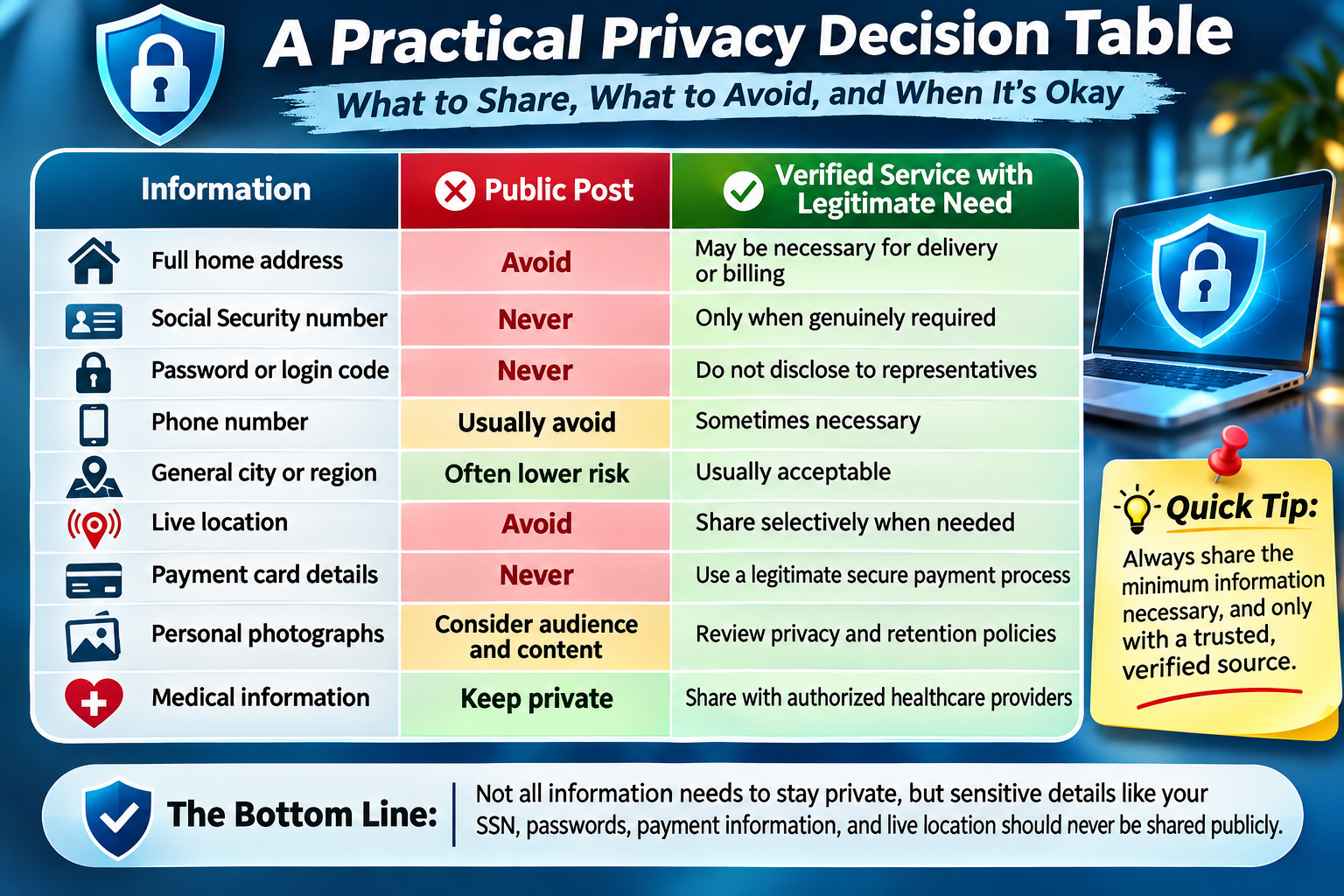
This distinction matters because the safest behavior isn't simply refusing every request. It's verifying the recipient, understanding the purpose, and providing the minimum information necessary.
The five-question privacy test
Before sharing something online, ask yourself:
Who can see it? Is the information public, limited to approved contacts, or available only to a verified organization?
Why is it needed? Does the person or service have a legitimate reason to request it?
Could it identify or locate me? Consider whether it reveals your identity, home, workplace, or daily routine.
Could it be combined with other information? A harmless detail might become sensitive alongside existing public records.
Would I be comfortable if it spread further? Screenshots, forwarding, account compromises, and changing privacy settings can expand the audience unexpectedly.
If you're uncertain, share less, delay the disclosure, or verify the request independently.
What to Do If You've Already Shared Personal Information Online
Realizing that you've exposed something private can be unsettling, especially when the information has been publicly available for some time.
Fortunately, the appropriate response depends on what was shared. Accidentally publishing your phone number is different from revealing a password, payment card number, or Social Security number. Taking action based on the actual risk is more useful than treating every incident as equally serious.
If you shared your address or phone number
Remove the information from the original post or profile where possible.
Review who could have accessed it, restrict unnecessary public visibility, and consider whether the information appears elsewhere online.
If you're receiving threatening or harassing contact, preserve evidence and report the behavior to the relevant platform or authorities.
If you exposed a password or verification code
Change the affected password immediately through the official website or application.
If the same password was used elsewhere, replace it on those accounts as well.
Review recent login activity, sign out unfamiliar sessions, and enable stronger authentication.
If you disclosed a one-time verification code, act quickly because it may have been used to access an account.
If you shared banking or payment information
Contact your bank or card issuer through its official customer service channels.
Explain what information was exposed and ask whether the account or card needs to be secured or replaced.
Monitor transactions and follow the institution's fraud reporting procedures.
If you exposed your Social Security number
Visit IdentityTheft.gov for guidance based on your circumstances.
Depending on the exposure, consider placing a credit freeze with the major credit bureaus and reviewing your credit reports for suspicious activity.
A credit freeze can make it harder for someone to open new credit accounts in your name, although it does not prevent every form of identity fraud.
If private photographs or conversations were shared
Preserve relevant evidence, including messages, usernames, and dates, before removing or reporting content.
Use platform reporting and removal procedures. If the content involves threats, extortion, or nonconsensual intimate imagery, seek appropriate specialized assistance and report the incident.
Do not pay someone who threatens to publish private material on the assumption that payment will guarantee deletion.

Build Better Online Privacy Habits That Last
The most effective privacy strategy is one you can maintain. Complicated security routines are less useful when they become so inconvenient that you eventually abandon them.
Instead of trying to review your entire digital life at once, focus first on the accounts and information that could cause the greatest harm if compromised.
Start with a 15-minute privacy checkup
Take a few minutes to:
· Review the visibility of your main social media profiles.
· Remove unnecessary personal information from public bios.
· Check location-sharing permissions.
· Enable MFA on your primary email account.
· Review active account sessions.
· Delete old posts containing sensitive details.
· Check whether you reuse passwords.
· Inspect the privacy settings of your most frequently used apps.
Review privacy whenever your circumstances change
Moving to a new home, changing jobs, starting a relationship, or joining a new online community can change what information you're comfortable sharing.
A public profile that felt appropriate several years ago may no longer reflect your needs.
Periodically reviewing old accounts is particularly important because forgotten profiles can continue exposing information long after you've stopped using them.
Make privacy a shared responsibility
Online safety isn't limited to your own accounts.
Friends and family may unintentionally reveal your location, identify your workplace, or publish photographs containing private information.
Discuss boundaries with people close to you. A simple request not to tag your location or publish children's school information can prevent unnecessary exposure.
Protecting Your Digital Identity Starts With What You Choose to Share
Understanding what information should never be shared online is ultimately about maintaining control over your personal life. Your identity, financial information, private conversations, and physical location deserve thoughtful protection. While the internet offers enormous opportunities for connection, entertainment, education, and professional growth, those benefits shouldn't require exposing every detail about yourself.
The most important lesson is that seemingly harmless information can become more revealing when combined. A birthday, workplace, location tag, and familiar username might appear insignificant in isolation. Together, they may provide enough context for someone to identify you, impersonate a trusted contact, or create a targeted scam. Protecting your privacy means paying attention to these connections, not just obvious secrets such as passwords and bank account numbers.
You also don't need to become suspicious of every online interaction. Instead, develop practical habits: verify unexpected requests, use strong account security, limit public profile details, review photographs before posting, and think carefully before sharing information about other people. Whether you're participating in social media, dating communities, professional networks, or online entertainment, the same principle applies: disclose information deliberately rather than automatically.
If you take only one action today, review the information visible on your most-used public profile. Look at it as a stranger would. Can someone identify where you live, where you work, when you're away from home, or how to contact you outside the platform? Remove anything unnecessary, then secure your primary email account with strong authentication. Those two actions create a practical foundation for better online privacy.
Your digital identity is built gradually, through thousands of small interactions. Protecting it works the same way. Every unnecessary detail you choose not to publish, every account you secure, and every suspicious request you verify helps reduce avoidable exposure. You can still share experiences, meet people, and participate fully in the digital world—while keeping the most personal parts of your life where they belong: under your control.

Top 10 FAQs: What Information Should You Never Share Online?
Can someone steal your identity using only your name and birthday?
A person's name and birthday are generally not enough on their own to commit most forms of identity theft. However, these details can help scammers locate additional personal information, impersonate someone, or make fraudulent messages appear more convincing.
The risk increases when your full name and date of birth are combined with your address, phone number, email account, or information exposed in a data breach. Limit unnecessary public access to identifying details, especially when several pieces of information appear together.
Is it safe to give your phone number to someone you met online?
Sharing your phone number with someone you recently met online carries privacy risks because it may be connected to your identity, social media accounts, or publicly available records.
A phone number can also be used for unwanted calls, phishing attempts, and account recovery attacks. Consider keeping conversations within a platform's messaging system until you feel comfortable sharing additional contact information. Never provide authentication codes sent to your phone.
Can someone find your personal information using your email address?
Yes. An email address can sometimes help someone discover associated social media profiles, usernames, public records, or information exposed in previous data breaches.
This does not mean that knowing an email address automatically grants access to private accounts. However, reusing the same address across many public services can make it easier to connect your online activities. Separate email addresses for personal, professional, and casual accounts can reduce unnecessary exposure.
What personal information can scammers collect from public social media profiles?
Scammers may collect names, photographs, employment details, relationship information, interests, locations, and information about friends or family members from publicly accessible profiles.
They can use these details to personalize phishing messages, impersonate trusted contacts, or develop convincing fraudulent stories. Even harmless-looking posts can reveal useful information when viewed together. Reviewing public profile visibility and limiting unnecessary details helps reduce these opportunities.
Are online quizzes that ask personal questions dangerous?
Online quizzes can create privacy risks when they request information commonly used for account security, such as your first pet's name, childhood street, first school, or mother's maiden name.
Not every quiz is malicious, but answers shared publicly may help someone guess security questions or impersonate you. Avoid quizzes that request sensitive identifying details, and never provide passwords, financial information, or account recovery codes to participate.
Can deleted social media posts still be found online?
Yes. Deleting a social media post does not guarantee that every copy disappears. Other users may have taken screenshots, downloaded photographs, forwarded messages, or archived the content before its removal.
Search engines and third-party services may also temporarily retain copies or references. Removing the original post is still worthwhile, but the safest strategy is to consider the potential audience and long-term consequences before publishing sensitive information.
Is it safe to share personal information through private messages?
Private messages are generally less publicly visible than social media posts, but they are not automatically confidential or secure. Recipients can screenshot conversations, forward messages, or access them through compromised accounts.
Some messaging services offer end-to-end encryption, which helps protect message contents during transmission and from service-provider access. However, encryption cannot prevent recipients from copying information. Avoid sending passwords, authentication codes, sensitive documents, or financial credentials through ordinary private conversations.
What are the warning signs that a website is collecting too much personal information?
A website may be requesting excessive information when it asks for sensitive details unrelated to its service, makes unnecessary fields mandatory, or provides no clear explanation of how information will be used.
For example, a simple newsletter subscription generally should not require your Social Security number or home address. Before submitting information, verify the website's identity, review its privacy practices, and question requests that seem disproportionate to the service being provided.
Can hackers use your photos and videos to impersonate you?
Yes. Publicly available photographs, videos, and voice recordings can sometimes be used to create AI-generated impersonations, fake profiles, or manipulated media known as deepfakes.
These materials may help scammers make fraudulent communications appear more convincing. Limit unnecessary public access to personal media, review who can download or share your content, and independently verify unusual requests supposedly coming from someone you know.
What is the safest way to verify someone asking for personal information online?
The safest approach is to independently confirm the person's identity and the legitimacy of their request before providing sensitive information.
If someone claims to represent a bank, employer, government agency, or online service, contact the organization using its official website, application, or a trusted telephone number. Do not rely solely on contact information supplied in the unexpected message. Legitimate organizations may request identity verification, but passwords and one-time authentication codes should never be disclosed to an unsolicited caller or message sender.
Recent Articles