Key Takeaways:
- Live cam requests allow viewers to interact with performers through chat, tipping, and personalized activities.
- Cam site tipping menus and tokens determine how paid requests work and what they cost.
- Private cam shows and custom cam requests offer different levels of personalized interaction.
- Clear communication and respectful requests help create a better live cam experience.
- Understanding pricing, performer boundaries, and privacy settings helps viewers enjoy live cam shows safely.
Introduction
One of the biggest attractions of live cam shows is the ability to interact with performers in real time. Unlike prerecorded videos, live cam requests give viewers an opportunity to participate in conversations, suggest activities, and enjoy a more personalized experience. But how do requests actually work, what do they cost, and how can you tell which requests are appropriate?
Whether you're visiting a webcam platform for the first time or looking to understand how interactive shows operate, knowing the basics can make the experience more enjoyable for everyone involved. From public chat requests and tipping menus to private sessions and customized experiences, this guide explains what to expect, how to communicate respectfully, and how to avoid common misunderstandings.
What Are Live Cam Requests and How Do They Work?
Live cam requests are suggestions or questions that viewers send to performers during a live broadcast. Depending on the platform, requests might involve asking a question, suggesting a conversation topic, requesting a song, or choosing an activity from a published menu. Some are free to ask, while others involve tips, tokens, or private-session charges.
The important distinction is that a request is an invitation, not an instruction. Performers decide which activities they offer, what they are comfortable doing, and whether they want to accept a particular suggestion. Even when a viewer pays for an available feature, that payment does not override a performer's boundaries or the platform's rules.
How a typical live cam request works
Find a live room
Browse performers, read room descriptions, and look for posted menus or chat guidelines.
Check whether requests are welcome
Ask a short, polite question or choose an explicitly offered activity.
Confirm the cost
Review any listed tip, token amount, minimum session duration, or private-show rate.
Wait for acceptance
The performer may agree, offer an alternative, postpone the request, or decline.
Enjoy the interaction respectfully
Follow room rules, respect the performer's decision, and avoid repeating declined requests.
For example, imagine joining a music-themed room where the performer has listed several songs they enjoy playing. You might ask whether a particular song is available, check the posted tip menu, and make the appropriate selection if the performer agrees.
That simple exchange illustrates the central principle behind interactive cam entertainment: viewers can influence parts of the experience, but the performer remains in control of the broadcast.
Types of Cam Girl Requests and Webcam Model Requests
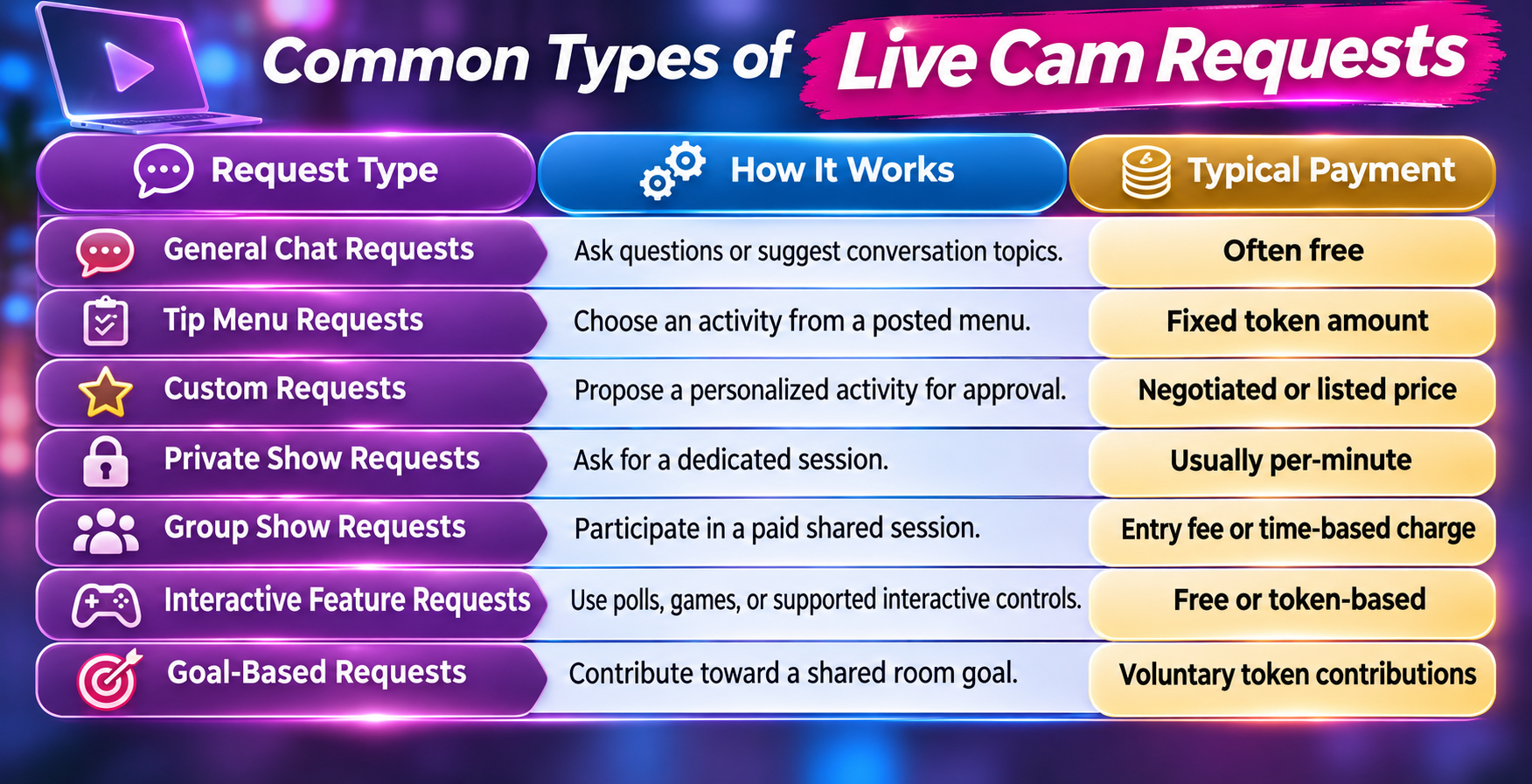
Not every request during a live show works the same way. Some involve simple conversation, while others use paid features that allow viewers to influence the direction of a broadcast. Understanding the different categories helps you recognize which interactions are available without spending money and which require additional tokens or a dedicated session.
Although people often search for cam girl requests, the same general principles apply to webcam performers of different genders and identities. Each performer sets their own preferences, and the available features depend on the website, account settings, and individual room.
Free conversation requests
Simple questions are often the easiest way to begin interacting with a performer. You might ask about their favorite music, hobbies, streaming schedule, or the theme of the current broadcast.
These requests generally do not require payment in rooms where public chat is enabled. However, busy performers cannot respond to every message, and some platforms restrict messaging privileges or provide additional communication features to paying members.
Tip menu requests
A tip menu is a list of activities a performer has chosen to offer, often with an associated token amount. Instead of guessing what is available, viewers can select from clearly displayed options.
Menus might include song selections, games, themed conversations, or other activities permitted by the platform. Their contents and prices can change between broadcasts, so always check the current menu rather than relying on information from an earlier visit.
Personalized requests
Custom requests involve something more specific than a standard menu item. For instance, a viewer might suggest a particular game format or ask whether the performer offers a certain themed conversation.
Because these requests are not necessarily part of the regular show, they require confirmation. A performer may quote a price, recommend a private session, suggest an alternative, or decline altogether.
How Cam Site Tipping Requests and Token Payments Work
Many cam platforms use virtual tokens to handle tips and paid interactions. Tokens allow viewers to support performers, participate in available activities, and pay for features without arranging a separate transaction each time. However, tokens are not universally priced, and the relationship between tipping and requests varies by website.
For example, Chaturbate's official support documentation describes tip menus and token-based interactions, while its terms clarify that tips are gratuities rather than enforceable promises of a particular performance. This distinction is worth understanding before making a payment.
Understanding tip menus and token amounts
Suppose a performer posts a menu with the following options. These amounts are hypothetical examples, not current platform prices.
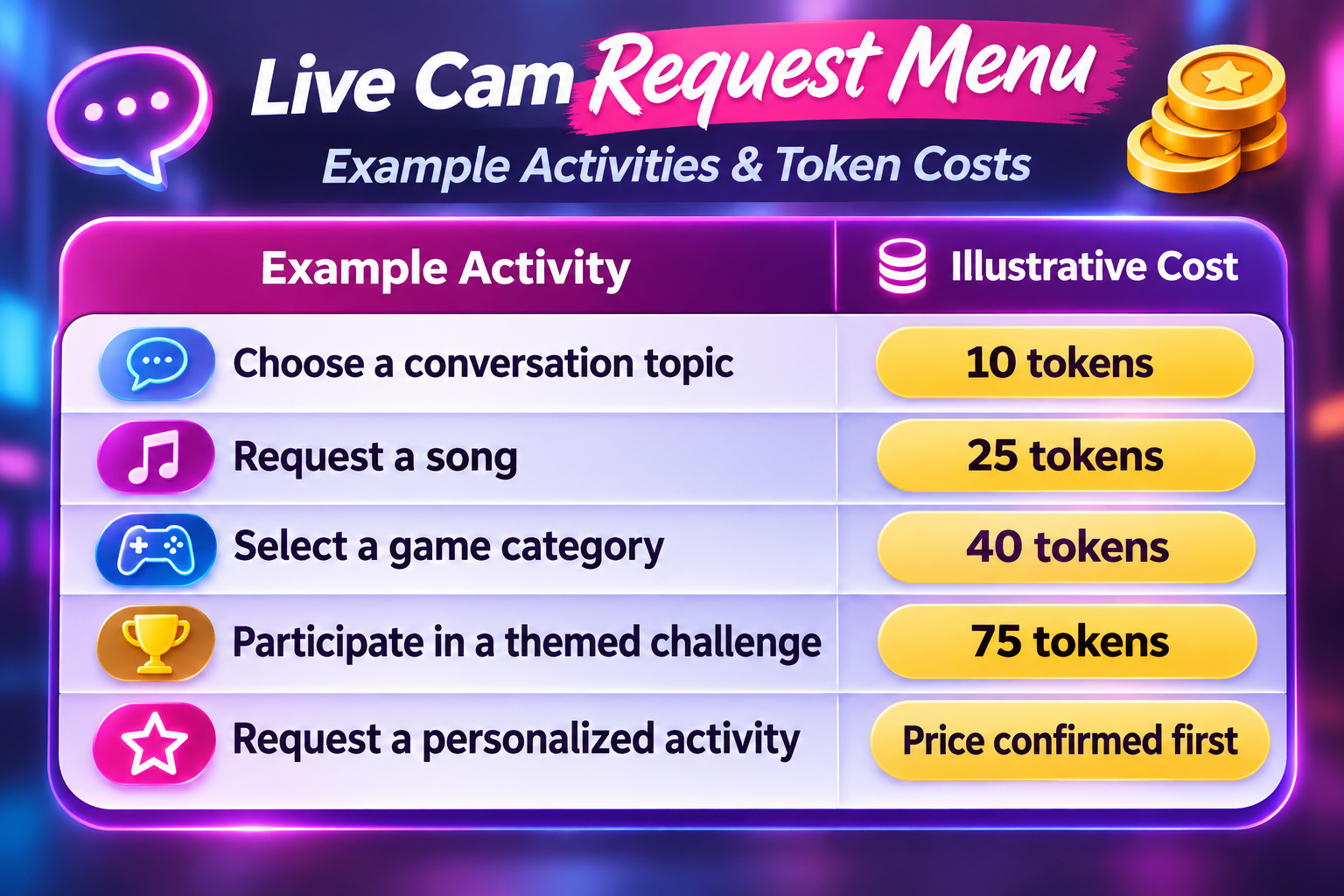
A token's purchase price depends on the platform and package. One website might sell tokens at a different rate from another, and buying larger packages may change the effective cost per token.
To calculate the approximate cost of a request, divide the price paid for a token package by the number of tokens received, then multiply by the tokens required.
For example, if a hypothetical package costs $20 for 200 tokens, each token costs $0.10. A 40-token menu selection would therefore represent $4 of that package's purchase value.
Does tipping guarantee a request will be accepted?
No. A tip does not automatically guarantee that a performer will accept or complete a request. Some tipping systems trigger an advertised feature, but other tips simply express appreciation.
Before sending tokens for a personalized activity, confirm that the performer offers it and that you understand the applicable terms. This helps prevent disagreements and makes the interaction more comfortable for both parties.
What happens if you tip the wrong amount?
Mistakes can happen, particularly when a viewer is unfamiliar with a platform's interface. You might select the wrong menu item, send more tokens than intended, or assume a particular request is available.
If that happens, explain the issue politely and consult the website's support policies. Do not assume that tokens are refundable or that a performer is required to provide an alternative activity. Some platforms treat completed tips as final transactions.
Private Cam Shows vs. Custom Cam Shows: What's the Difference?
Private cam shows and custom cam shows are often discussed together, but they describe different aspects of the experience. A private show refers primarily to the viewing arrangement, while a custom show emphasizes personalized content or interaction. A custom activity may occur within a private session, but the two terms are not interchangeable.
Knowing this distinction is especially important when comparing rates and deciding what kind of experience you want. Paying for private access does not automatically mean every possible request is included, and a customized activity does not necessarily require a private room.
Private cam shows explained
A private show is a session in which a viewer receives dedicated access to a performer, typically at a per-minute token rate. Some platforms allow additional paying viewers to observe through a feature commonly called spy mode.
On Chaturbate, for example, viewers initiate private-show requests and broadcasters choose whether to accept them. Performers can also set their own per-minute rates and minimum session lengths.
Private sessions can be appealing when you prefer a quieter conversation, more individual attention, or an activity that the performer has specifically agreed to offer.
How custom cam shows work
Custom cam shows are designed around an agreed-upon preference or activity. Rather than following a standard public-room format, the performer and viewer establish what is available before proceeding.
A custom request might involve a specific conversation theme, a personalized greeting, a music-related activity, or another permitted feature. Availability depends entirely on the performer's preferences and the platform's rules.
The most effective approach is to discuss the scope, timing, and price before payment. Never assume that the word custom means unlimited requests.
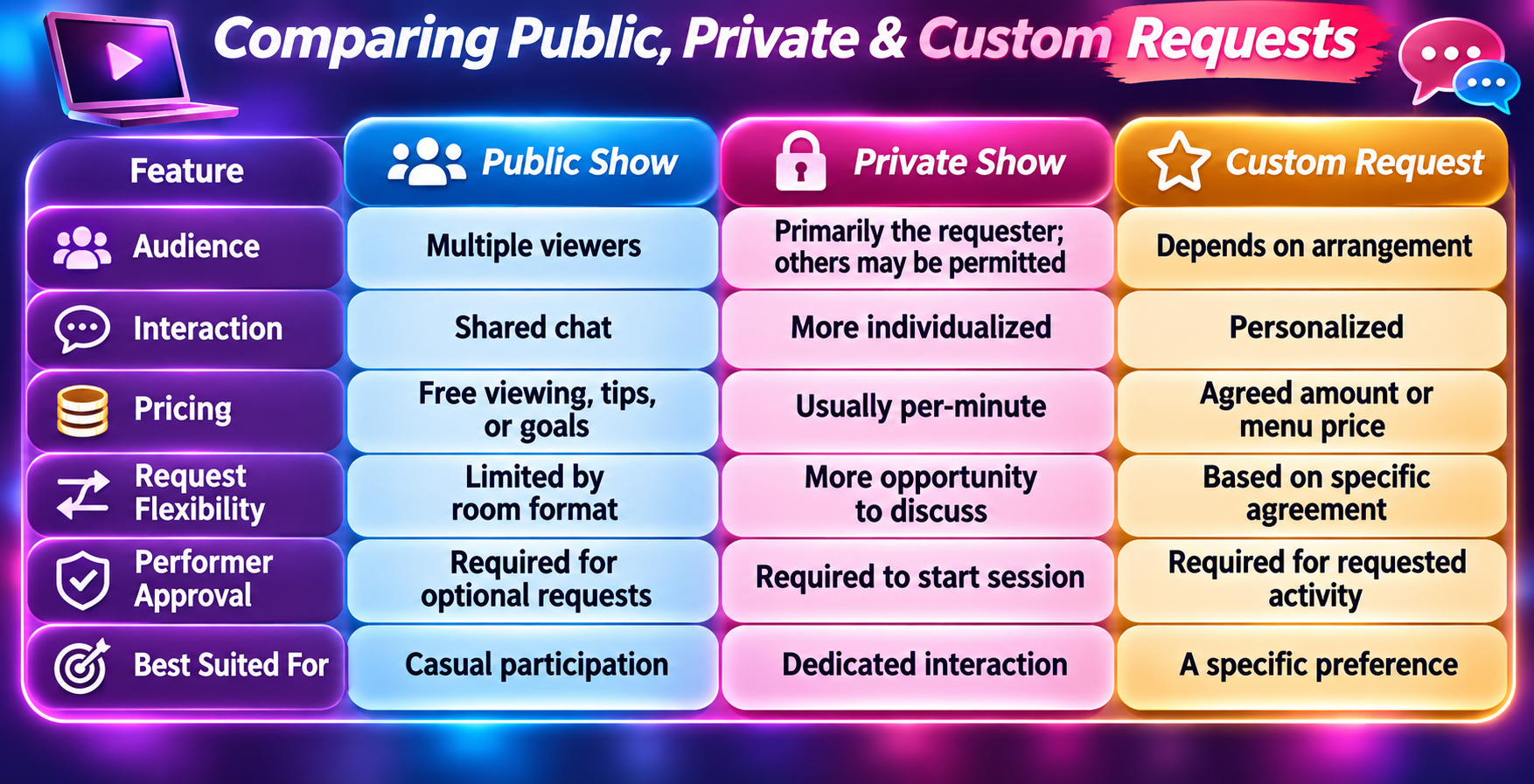
Some services also offer exclusive private shows, which prevent other paying viewers from observing the session. CamSoda's support materials distinguish ordinary private sessions, exclusive private sessions, and spy shows.
For viewers exploring different formats, browsing live cam shows can be a useful starting point for understanding the variety of performer styles and interactive experiences available.
How to Make Live Webcam Chat Requests Respectfully
Successful live webcam chat requests begin with communication rather than payment. A polite, clearly worded question is usually easier for a performer to understand than an abrupt demand or a lengthy message containing several unrelated suggestions.
Remember that performers may be managing multiple conversations, technical controls, and ongoing activities simultaneously. A delayed response does not necessarily mean they are ignoring you. Choosing the right moment and keeping your message straightforward can make a noticeable difference.
Examples of good requests
Here are several examples of clear, low-pressure messages:
· "Hi! Are you taking song requests today?"
· "I noticed you have a game menu. How does that work?"
· "Do you offer private chat sessions?"
· "Would you be open to a custom conversation theme?"
· "Is that activity available during this show, or only in private?"
· "Could you explain how your tip menu works?"
Each example gives the performer room to respond without creating an expectation that they must agree.
Common mistakes that make requests less effective
Repeatedly posting the same request can disrupt a room and frustrate other viewers. Sending tips without checking the menu can also create confusion, particularly if you expect an activity that was never offered.
Other mistakes include negotiating aggressively, interrupting an ongoing activity, demanding immediate attention, or continuing after a performer declines.
What to do when a performer says no
If a request is declined, acknowledge the answer and move on. There is no need to challenge the decision or offer progressively larger tips to pressure the performer into changing their mind.
A simple response such as "No problem, thanks for letting me know" keeps the atmosphere friendly and leaves the door open for other interactions that both parties enjoy.
How Interactive Live Cam Shows Use Games, Goals, and Viewer Participation
Interactive live cam shows can offer more than individual requests. Some rooms feature games, polls, shared goals, or interactive controls that allow multiple viewers to participate in the broadcast. These features create a different experience from one-on-one requests because audience participation becomes part of the show's overall format.
The level of interactivity varies considerably. Some performers prefer casual conversation, while others organize structured activities with clear rules, schedules, or token requirements. Understanding the format before participating helps you avoid confusion about what your contribution will accomplish.
Tip goals and community milestones
A tip goal is a shared target that viewers contribute toward during a broadcast. Once the goal is reached, the performer may introduce an advertised activity or move to the next stage of the show.
For example, a performer might set a community goal for launching a trivia game or starting a themed music session. Multiple viewers can contribute rather than having one person cover the entire amount.
The key difference is that a contribution to a group goal is not necessarily an individual request. Viewers should read the goal description and understand how the platform handles contributions.
Polls and interactive games
Some rooms allow viewers to vote between available choices, participate in games, or select from a limited number of options.
These features can be particularly welcoming for beginners because the choices are already defined. Instead of wondering what to request, a viewer can participate within the structure the performer has established.
Interactive devices and connected features
Certain platforms support connected devices or interactive technology that responds to authorized viewer actions. These features may use token-based controls, timed interactions, or other settings configured by the performer.
For example, some cam platforms support interactive device integrations, while their creator settings allow performers to determine which functions are enabled.
Viewers should treat these systems like any other optional feature: check what is available, understand the cost, and respect the performer's control over the technology.
How Much Do Live Cam Requests Cost?
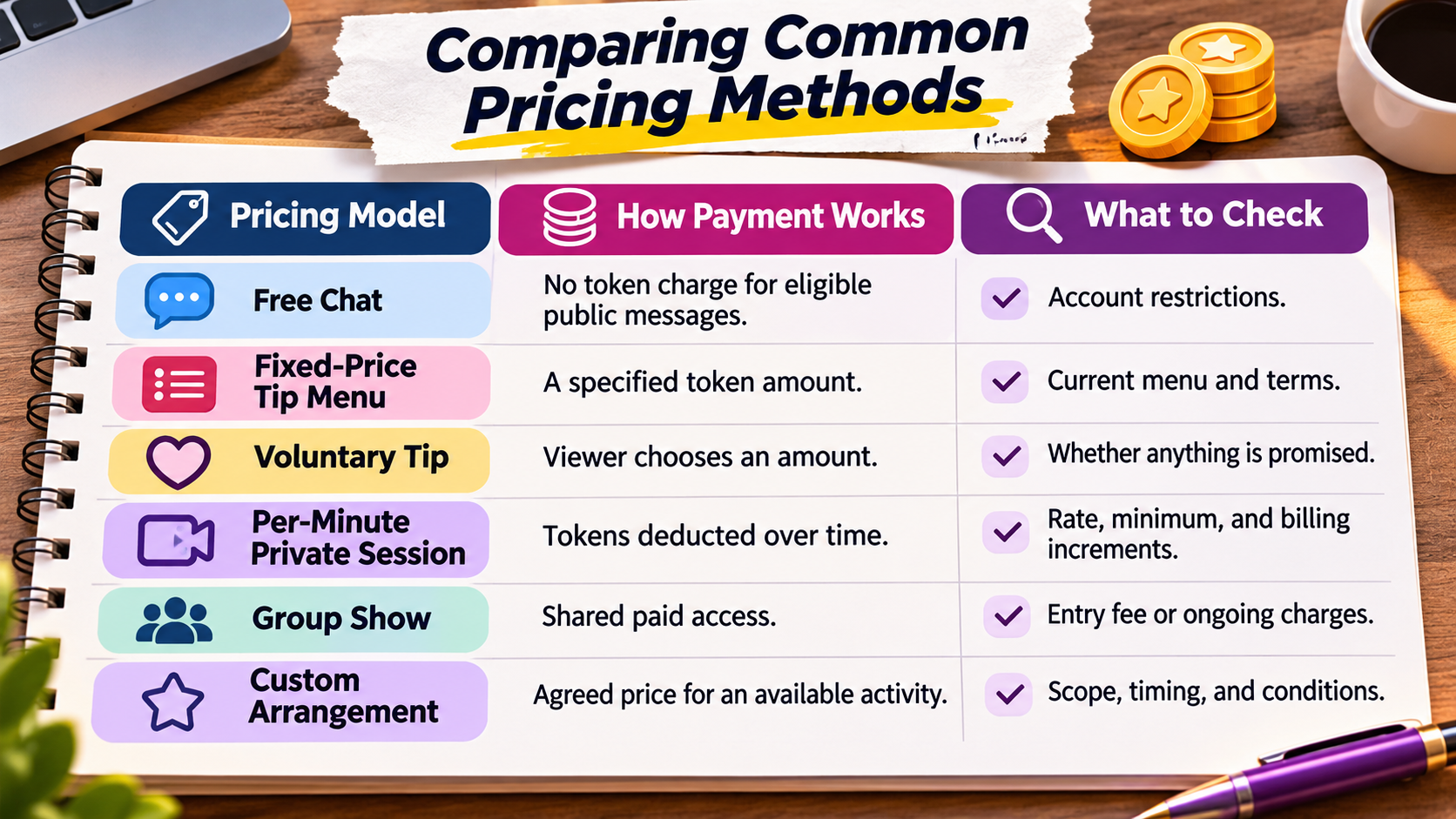
There is no single standard price for live cam requests. Some forms of interaction are free, some have a fixed token amount, and others are charged according to session length. The final cost depends on the platform, the performer's settings, and the type of interaction.
A viewer who only wants to participate in public chat may spend nothing. Someone choosing multiple tip-menu activities or booking a private session can spend considerably more. Knowing how pricing works is more useful than relying on an advertised starting rate alone.
How to estimate a private show's total cost
A useful starting calculation is:
\[ \text{Estimated session cost}=\text{Tokens per minute}\times\text{Minutes} \]
If a performer charges a hypothetical 60 tokens per minute and you stay for eight minutes, the session would require approximately 480 tokens, before any additional charges.
However, the actual amount charged may depend on minimum durations, billing increments, or other platform settings. Always review the displayed price before starting.
How to avoid spending more than planned
Set a spending limit before purchasing tokens. If you want to try several activities, estimate their combined cost rather than treating each tip as an isolated purchase.
It also helps to check whether automatic token refills are enabled, watch your remaining balance, and understand how to end a paid session. A good entertainment experience should not leave you surprised by the bill.
What Happens When Live Cam Requests Are Ignored, Delayed, or Declined?
Not every live cam request receives an immediate response, even when the viewer follows the rules. Performers may be busy with other participants, managing technical issues, or concentrating on an activity already in progress. In popular rooms, chat messages can move quickly enough that a reasonable request disappears before anyone notices it.
Understanding the difference between a missed message, a delayed activity, and a declined request helps prevent unnecessary frustration. Each situation calls for a slightly different response, and not every problem requires contacting customer support.
Why a request might not receive a response
Several common circumstances can explain why a performer has not acknowledged your message:
· The chat room is particularly busy.
· The performer is completing an earlier request.
· The message was filtered or missed.
· The requested activity is not currently available.
· The performer has temporarily paused requests.
· The request conflicts with room rules or personal boundaries.
If your message was missed, waiting for a natural break in the conversation before asking again is reasonable. Avoid flooding the chat with repeated messages.
What if you paid for a request that wasn't completed?
First, check whether you selected an advertised menu activity or simply sent a voluntary tip. The distinction matters because platform policies may treat those transactions differently.
If an agreed-upon activity does not happen, ask politely whether it has been postponed. If the issue remains unresolved, contact the platform's official support team with the transaction details. Keep in mind that refunds are not guaranteed, especially where tokens are treated as final gratuities.
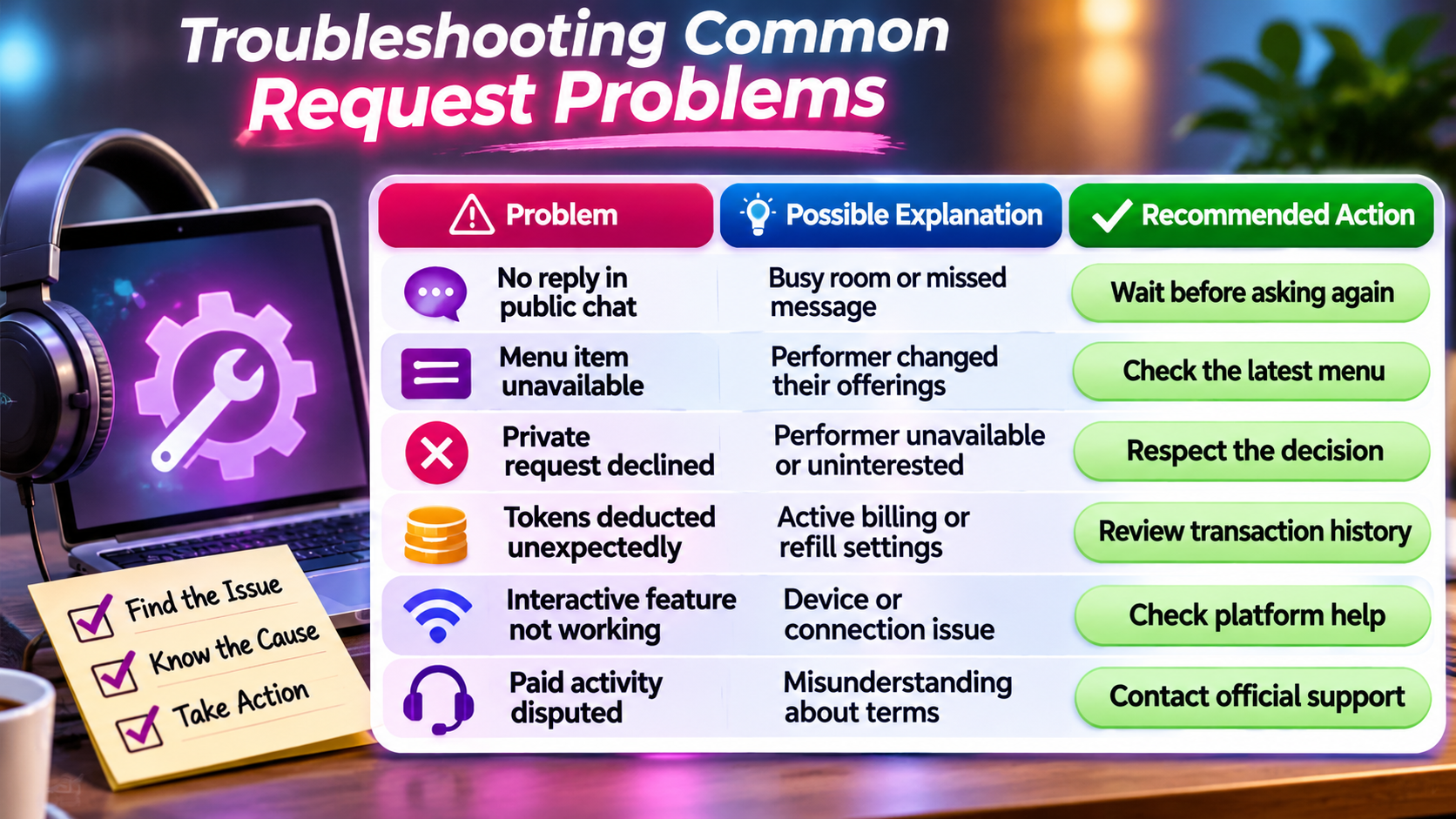
Keeping communication calm and using the platform's established support channels is usually more productive than arguing in public chat.
Staying Safe and Protecting Your Privacy During Cam Requests
Live cam entertainment should be approached with the same privacy awareness as other online interactions involving payments and personal communication. Although established platforms provide tools for managing accounts and transactions, users should still understand what information they are sharing and how the service handles it.
This is especially important during personalized or private interactions, where viewers may feel comfortable revealing more about themselves. A private session does not necessarily mean that everything is anonymous, unrecorded, or inaccessible to other participants.
Keep payments on the official platform
Avoid sending money through personal payment apps or following unsolicited links to complete a request. Off-platform transactions may eliminate protections provided by the cam service and can expose sensitive payment information.
Some platforms expressly prohibit performers from soliciting outside payments or arranging off-platform meetings.
CamSoda's published broadcasting rules, for example, include restrictions on both activities.
Understand what private really means
Before beginning a private session, determine whether the platform allows additional viewers through spy mode. Also check its recording policies, because private viewing arrangements and recording permissions are separate matters.
CamSoda's documentation, for instance, describes recording controls and different private-show formats.
Avoid sharing your full name, home address, workplace, personal contact details, or financial information in chat. Use the site's privacy settings and reporting tools whenever necessary.
Recognize suspicious requests or payment demands
Be cautious when someone asks you to move a conversation to an unfamiliar website, send payment to an individual account, download unknown software, or disclose personal information to unlock a feature.
A legitimate paid interaction should have understandable terms and use supported platform functionality. If something feels inconsistent with the website's rules, stop and verify it before proceeding.
How to Choose the Right Live Cam Experience for Your Requests
Finding a compatible performer is often more important than discovering a platform with the longest feature list. A room that welcomes music requests and casual conversation may provide a better experience for one viewer, while another may prefer structured games or scheduled private sessions.
The best choice depends on what you actually want to do. Instead of joining a random broadcast and immediately asking for something specific, look for performers whose descriptions, menus, and interaction styles already match your interests.
What to look for before joining a show
Start with the room description and any posted guidelines. These often explain whether the performer accepts requests, offers private sessions, or uses a tip menu.
Pay attention to how the performer communicates with viewers. Someone who explains their menu clearly, maintains consistent boundaries, and provides understandable pricing makes it easier to decide whether to participate.
Match your request to the room format
If your goal is casual conversation, a public room with an active but manageable chat may be ideal. For a more personalized experience, look for performers who explicitly offer private sessions or custom activities.
You can explore interactive live cam shows to become familiar with different broadcast formats, then compare the options and current features available.
For people interested in broader adult social networking and meeting others with similar interests, adult friendfinder offers a different kind of experience focused on adult connections and community interaction rather than individual cam-show requests.
Five questions worth answering before spending tokens
Before making a paid request, consider whether you can answer these questions:
1. Does the performer actually offer the activity I want?
2. Is the request available in public chat or only during a private session?
3. What is the complete cost, including any minimum duration?
4. Does the performer need to approve the request before payment?
5. What happens if the activity cannot be completed?
When those details are clear, the experience is much easier to navigate.

Making Your Next Live Cam Request a Better Experience
The most important thing to understand about live cam requests is that interaction works best when viewers and performers share clear expectations. Requests give audiences a way to participate, but they do not remove the performer's freedom to decide what happens during a broadcast. That balance is what makes live entertainment different from selecting a prerecorded video.
A successful request begins with understanding the room, checking what is offered, and communicating in a way that leaves everyone comfortable.
Pricing deserves just as much attention as communication. Tip menus, virtual tokens, group goals, and private-session rates all operate differently. Learning how these systems work allows you to compare experiences without relying on assumptions. Before spending money, review the current rates, calculate the likely total, and confirm whether the activity you want is actually available. A little preparation can prevent confusion and help you stay within your entertainment budget.
It's also worth remembering that the most enjoyable interactions are not necessarily the most expensive ones. A thoughtful question, a shared interest, or participation in a simple game can make a public broadcast memorable.
Private and custom shows offer additional possibilities, but their value depends on the quality of communication and whether the experience matches your preferences. Finding a performer whose style naturally appeals to you is often a better strategy than trying to change the direction of an unfamiliar room.
Finally, approach every request with respect for boundaries, privacy, and platform rules. Use official payment methods, understand the difference between private and exclusive sessions, and accept that performers can decline activities.
If you're new to cam shows, start by observing a few rooms, reading their menus, and trying a simple conversation request. Once you understand how the system works, you can explore additional interactive features with greater confidence and make informed choices about how you participate.

Frequently Asked Questions (FAQs): How Requests Work During Live Cam Shows
Can you make requests during a live cam show without buying tokens?
Yes, some live cam platforms allow viewers to make basic requests without purchasing tokens. Free requests may include asking general questions, suggesting conversation topics, or participating in public chat. However, performers may reserve certain activities for paying viewers, and some websites limit messaging privileges for free accounts. Check the room's rules to understand which interactions are available without payment.
How long does it take for a webcam model to respond to a request?
Response times vary depending on the performer's availability, the number of viewers, and the type of request. Simple chat questions might receive an immediate response, while personalized requests may require additional discussion or scheduling. In busy rooms, performers may prioritize previously accepted activities or paid interactions. There is no universal response-time guarantee, even when a viewer has sent tokens.
n you schedule custom cam shows in advance?
Some webcam performers offer scheduled custom cam shows or private sessions, allowing viewers to arrange an experience before the broadcast begins. Scheduling may involve confirming availability, discussing permitted activities, and agreeing on pricing. Not every platform provides built-in booking tools, so viewers should check the performer's profile and use approved communication and payment methods.
What is the difference between a tip request and a paid private cam session?
A tip request usually involves sending a specified number of tokens for an available activity during a live broadcast. A paid private cam session provides a more individualized viewing arrangement, typically charged by the minute. Tip requests are generally shorter and more specific, while private sessions may allow extended interaction. Both depend on performer approval and the platform's payment rules.
Can multiple viewers make requests during the same live cam show?
Yes, many public live cam shows allow multiple viewers to submit requests, participate in games, or contribute toward shared goals. Performers may manage these interactions through tip menus, chat moderation, or request queues. When several requests arrive simultaneously, the performer determines which ones to address and in what order. Contributing tokens does not necessarily guarantee priority over other viewers.
Are live cam requests anonymous to performers and other viewers?
Live cam requests can offer a degree of privacy, but they are not necessarily anonymous. Performers and other participants may see your username, public chat messages, and certain tipping activity. Private messages may provide additional discretion, depending on the platform. To protect your identity, use a non-identifying username, review account privacy settings, and avoid sharing personal information during interactions.
Can you cancel a live cam request after sending tokens?
Cancellation options depend on the platform and whether the transaction has already been processed. Some requests may be changed before an activity begins if the performer agrees, but completed tips are often nonrefundable. Private sessions may also have minimum charges or billing rules. Before sending tokens, verify the request details and review the website's cancellation and refund policies.
Do webcam models have a limit on how many requests they accept?
Yes, webcam performers can limit the number and types of requests they accept during a broadcast. Some use request queues, scheduled activities, or restricted tip menus to manage audience participation. Others temporarily stop accepting requests when their rooms become busy. These limits help performers maintain control of their broadcasts and provide a more organized experience for viewers.
Can live cam requests be made from a mobile phone?
Yes, many live cam websites support requests through mobile browsers or compatible applications. Depending on the platform, mobile viewers may be able to send chat messages, purchase tokens, select tip-menu activities, and request private sessions. However, certain interactive features may work differently on mobile devices. A stable internet connection and an updated browser can help reduce technical interruptions.
What happens if a live cam show ends before your request is completed?
If a broadcast ends before a request is completed, the outcome depends on the type of payment and the platform's policies. An unpaid request simply expires unless the performer offers to revisit it later. For a paid request, viewers should check whether the activity was formally accepted and whether the platform provides dispute or support options. Keep transaction records and contact official customer support if a billing issue remains unresolved.
Recent Articles