Key Takeaways
- Start conversations in cam rooms with friendly greetings, natural questions, and genuine curiosity.
- Learn how to talk to cam models confidently by choosing the right moment and keeping conversations engaging.
- Follow proper cam room etiquette by respecting boundaries, avoiding spam, and understanding performer expectations.
- Get a cam model's attention naturally through thoughtful participation rather than demanding responses or relying on tips.
- Enjoy safer, more rewarding live webcam chats by protecting your privacy, understanding paid features, and choosing the right room.
Starting a conversation in a live cam room can feel surprisingly intimidating, especially when you're new to the experience. Knowing how to start a conversation in a cam room and how to talk to cam models can make the difference between an awkward first interaction and an enjoyable, natural exchange. The good news? You don't need clever pickup lines, expensive tips, or a big personality to make a positive first impression.
Whether you're exploring live webcam chat for the first time or hoping to become more comfortable interacting with performers, a little preparation goes a long way. Understanding how cam rooms work, what to say, when to participate, and how to respect boundaries can help you feel more confident while making the experience more enjoyable for everyone involved.
How to Start a Conversation in a Cam Room Without Feeling Awkward
The easiest way to start a conversation in a cam room is to say hello, introduce yourself briefly, and ask a friendly question related to what's happening in the room. You don't need a rehearsed opening or an attention-grabbing message. A genuine greeting is often enough to begin interacting, particularly when the performer has time to respond.
Unlike ordinary messaging platforms, live cam rooms are shared spaces where performers may be entertaining multiple viewers simultaneously. Messages can move quickly, and the person hosting the room may be balancing conversation, performance, moderation, and technical controls. Understanding that environment helps you approach conversations with realistic expectations.
Five easy conversation starters for beginners
· "Hey! How's your day going so far?"
· "Hi, I'm new here. How does the chat usually work?"
· "That music is great. What's playing?"
· "What's been the highlight of your day?"
· "Hey everyone! What's the vibe in here tonight?"
These simple messages work because they are friendly, open-ended, and easy to answer. They also allow the performer to decide how much to engage without feeling pressured.
A useful rule is to make your first message an invitation, not a demand. Asking a question creates an opportunity for conversation. Demanding attention can make the interaction uncomfortable before it even begins.
Live Webcam Chat for Beginners: Understand the Room Before You Speak
Before learning how to chat on live cam sites, it helps to understand what makes these environments different from regular video calls or social media conversations. A cam room combines live entertainment with real-time communication, allowing viewers to watch, comment, react, and sometimes participate in interactive features.
However, not every room operates the same way. Some emphasize casual conversation and community interaction, while others focus on scheduled performances, tipping goals, or private experiences. Learning the difference helps you choose the right environment and avoid misunderstandings.
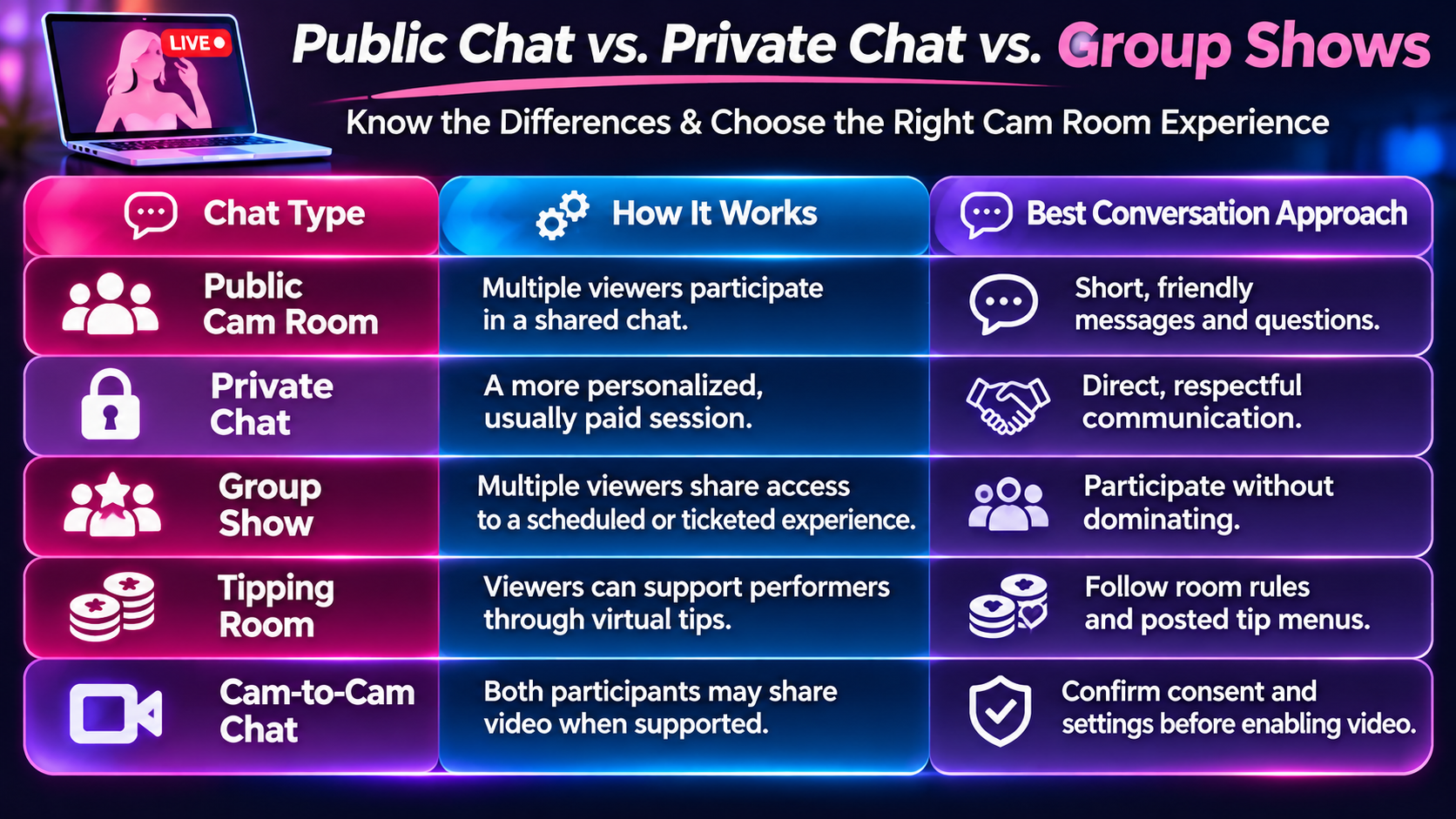
Platforms may use different names, pricing structures, and access rules for these experiences.
For example, live cam rooms can offer different ways to discover performers and interact, depending on the available features and individual broadcast settings.
Read the room before joining the conversation
Spend a minute observing the conversation before sending your first message. Notice whether the performer is actively answering questions, concentrating on a performance, or talking with familiar viewers.
Also check the profile description, room topic, pinned messages, and any posted rules. These details can tell you whether questions are welcome, what types of interaction are available, and which subjects the performer prefers to avoid.
A good conversation begins with awareness. You don't have to become an expert on cam sites before participating, but understanding what's happening around you makes your first interaction much easier.
What to Say to a Cam Model: Conversation Starters That Feel Natural
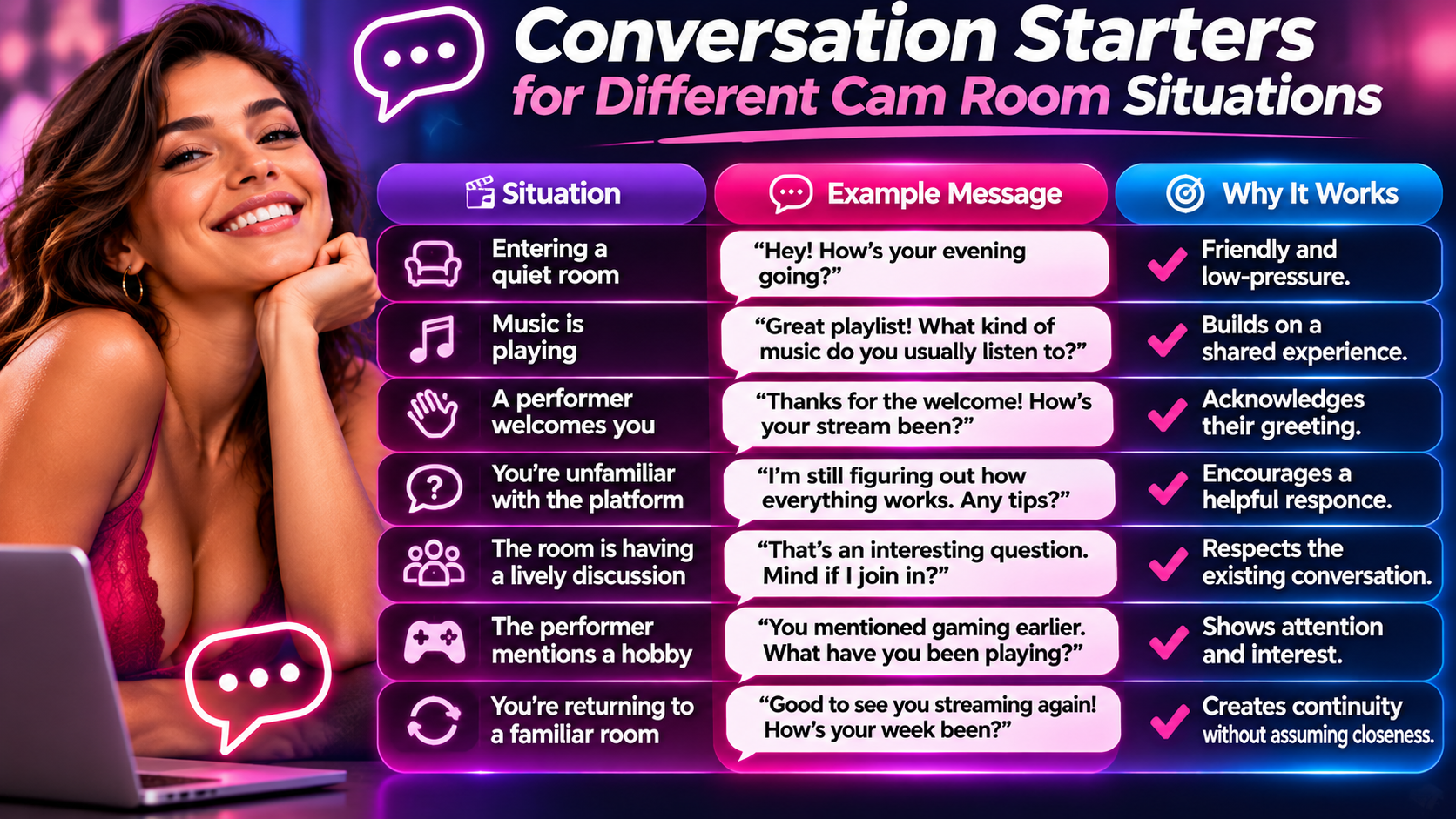
One of the most common questions beginners have is what to say to a cam model after the initial greeting. The answer depends on the atmosphere of the room and the performer's communication style. Some enjoy playful banter, while others prefer relaxed conversations about music, hobbies, entertainment, or everyday experiences.
The goal isn't to impress someone with the perfect line. It's to create a comfortable opening that gives the other person something interesting to respond to. Questions connected to the present moment often work better than generic comments because they demonstrate that you're actually paying attention.
Ask questions that encourage conversation
Questions that invite more than a yes-or-no answer can help a conversation develop naturally. Instead of asking "Do you like movies?" try asking "What's a movie you could watch over and over?"
The second question offers more possibilities. The performer might mention a favorite genre, tell a story, or ask about your preferences.
You can also use a simple conversational pattern:
Observe something → ask a question → respond to the answer.
For example:
Viewer: "That background lighting looks really cool. Did you set it up yourself?"
Performer: "Yeah! I changed everything around yesterday."
Viewer: "Nice! The colors work really well together. Do you switch up the setup often?"
The exchange develops because each message connects to something the other person said.
What if you don't know what to say next?
You don't need to fill every pause. Live conversations naturally include quiet moments, interruptions, and changes of topic.
If the discussion slows down, refer to something already mentioned or ask a new question about the room's current activity. If nothing comes to mind, simply enjoy the broadcast until another natural opportunity appears.
Trying too hard to maintain constant conversation can be more awkward than allowing a little silence.
How to Talk to Cam Models and Keep the Conversation Going
Learning how to interact with webcam models involves more than starting conversations. It also means recognizing when someone is interested in continuing, responding thoughtfully, and understanding that performers have responsibilities beyond answering individual messages.
A live cam performer might be talking to several viewers, adjusting streaming equipment, reading requests, or managing paid sessions. A successful conversation respects those competing demands instead of treating every delayed response as a personal rejection.
Follow the conversation instead of forcing a topic
Pay attention to what the performer chooses to discuss. If they seem enthusiastic about music, travel, movies, or a particular hobby, exploring that topic can create a more natural exchange.
If they provide a short answer and move on, don't repeatedly return to the same question. Try another subject when appropriate, or allow the conversation to end.
The most enjoyable exchanges tend to feel collaborative rather than like interviews.
Use compliments that are specific and appropriate
A thoughtful compliment can be a friendly way to acknowledge a performer, but repeating generic praise rarely creates much conversation.
Compare these examples:
· Generic: "You're amazing."
· More conversational: "You've got a really welcoming energy in here."
· Specific: "I like how you make new people feel included in the chat."
The more specific examples give the performer something meaningful to respond to without requiring them to acknowledge their appearance.
Compliments should also be sincere. Exaggerated flattery or repeated praise designed to obtain attention can feel transactional.
Don't confuse friendly interaction with personal intimacy
Live cam performers may create welcoming, personable environments as part of their professional work. A friendly response, remembered username, or engaging conversation doesn't automatically mean someone wants a personal relationship outside the platform.
Enjoy the interaction for what it is. Avoid assuming that frequent visits, compliments, or financial support create special obligations.
This distinction helps maintain realistic expectations while respecting the person behind the screen.
Cam Room Etiquette: The Rules Every Beginner Should Know
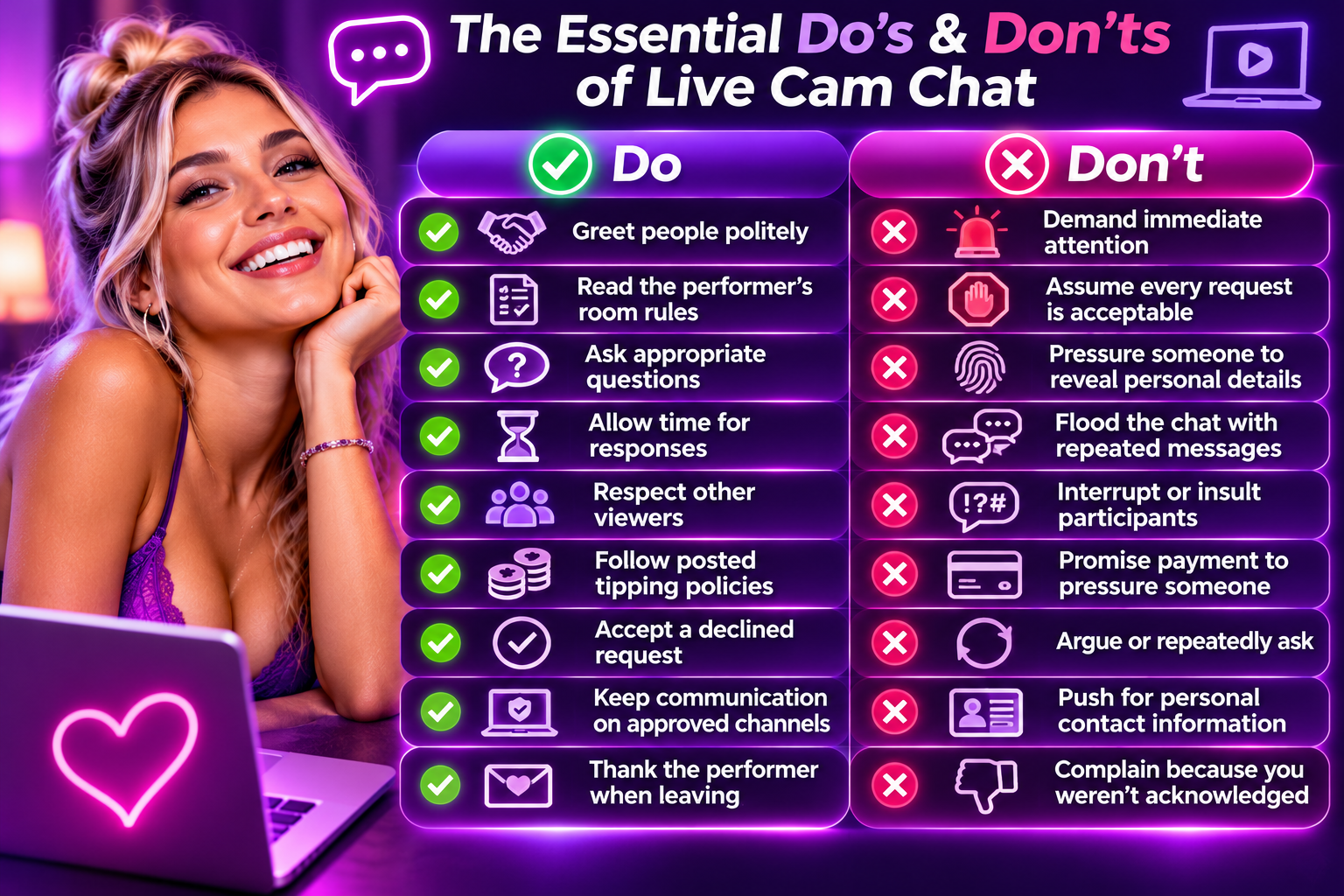
Good cam room etiquette makes conversations easier for performers, viewers, and moderators. Although individual platforms establish their own rules, most positive interactions share a few principles: respect personal boundaries, avoid disruptive behavior, and recognize that the performer controls their own broadcast.
These expectations aren't just theoretical. Performer-focused guidance emphasizes the importance of posted room rules and clear boundaries, while platform documentation distinguishes between public participation, tipping, and private interaction.
Understanding those differences helps prevent uncomfortable situations.
Respect boundaries even when you're paying
A paid interaction doesn't remove the performer's right to decline requests. Private sessions, tips, and other paid features operate within platform policies and individual boundaries.
For example, if a performer explains that a particular activity isn't available, the appropriate response is to acknowledge the answer and move on. Offering more money or repeatedly asking doesn't make the request acceptable.
Avoid asking for identifying personal information
Questions about someone's legal name, home address, workplace, family, or exact location can create privacy and safety concerns.
Keep questions focused on subjects the performer voluntarily shares. Someone discussing a favorite city or vacation doesn't necessarily want to reveal where they live.
The same principle applies to your own privacy. Avoid posting personal contact details, financial information, or anything you wouldn't want other viewers to see.
Understand the role of moderators
Some rooms have moderators who help maintain the conversation, enforce rules, and manage disruptive viewers. Their responsibilities may include removing inappropriate messages or restricting access when necessary.
If a moderator asks you to change your behavior, follow the instruction rather than arguing publicly. If you encounter harassment or suspected rule violations, use the platform's reporting features.
How to Get a Cam Model's Attention Without Being Pushy
In a busy room, getting noticed can be challenging. Your message may disappear beneath dozens of other comments before the performer has a chance to read it. That's a normal part of real-time group communication, not necessarily an indication that you're being ignored.
The most practical way to get a cam model's attention is to participate at an appropriate moment, send a concise message, and make it easy to answer. Recognition should develop naturally rather than becoming something you try to force.
Choose the right moment to speak
Timing matters. A performer who is answering questions or chatting casually may be more available than someone concentrating on a scheduled activity.
Watch for natural openings, such as when they invite questions, greet new arrivals, or pause between activities.
Instead of interrupting an ongoing exchange, wait for a moment when your message fits the conversation.
Keep messages short and readable
Long paragraphs are difficult to follow in a fast-moving chat room. Short, conversational messages are easier for both performers and other viewers to understand.
For example, rather than introducing yourself with a lengthy personal story, start with a greeting and one relevant question.
If the performer responds, you can gradually share more information as the conversation develops.
Become a familiar, respectful participant
Regular participation can make a username more recognizable over time. Returning to a room, remembering previous conversations, and treating others respectfully can contribute to a comfortable atmosphere.
However, familiarity doesn't guarantee recognition or a personal connection. Performers interact with many viewers and may not remember every conversation.
What to do when your messages go unanswered
If a message receives no response, consider three possibilities: the performer didn't see it, they're occupied, or they don't wish to answer.
You can try another appropriate question later, but avoid repeating the same message continuously.
Sometimes the best response is to enjoy the room without actively participating, or explore another broadcast where the conversation style better suits you.
Live Cam Chat Tips: How Tipping and Paid Features Affect Conversation
Tipping can be part of the live cam experience, but beginners sometimes misunderstand its purpose. A tip may express appreciation, contribute toward a room goal, or pay for a listed interaction, depending on how the platform and performer organize their broadcast.
It is important to separate ordinary conversation from paid requests. Not every greeting requires payment, but not every performer offers extended individual conversation for free. Understanding these differences helps you participate without creating unrealistic expectations.
Do you need to tip to talk to a cam model?
Not necessarily. Some public rooms allow viewers to send ordinary chat messages without tipping, while other features may require an account, credits, or a paid membership.
The ability to send messages also doesn't guarantee that every message will receive a response. A performer may prioritize particular activities or paid interactions, especially during busy broadcasts.
Before spending anything, check the site's current pricing, payment terms, and the performer's posted rules.
Understand tip menus before making requests
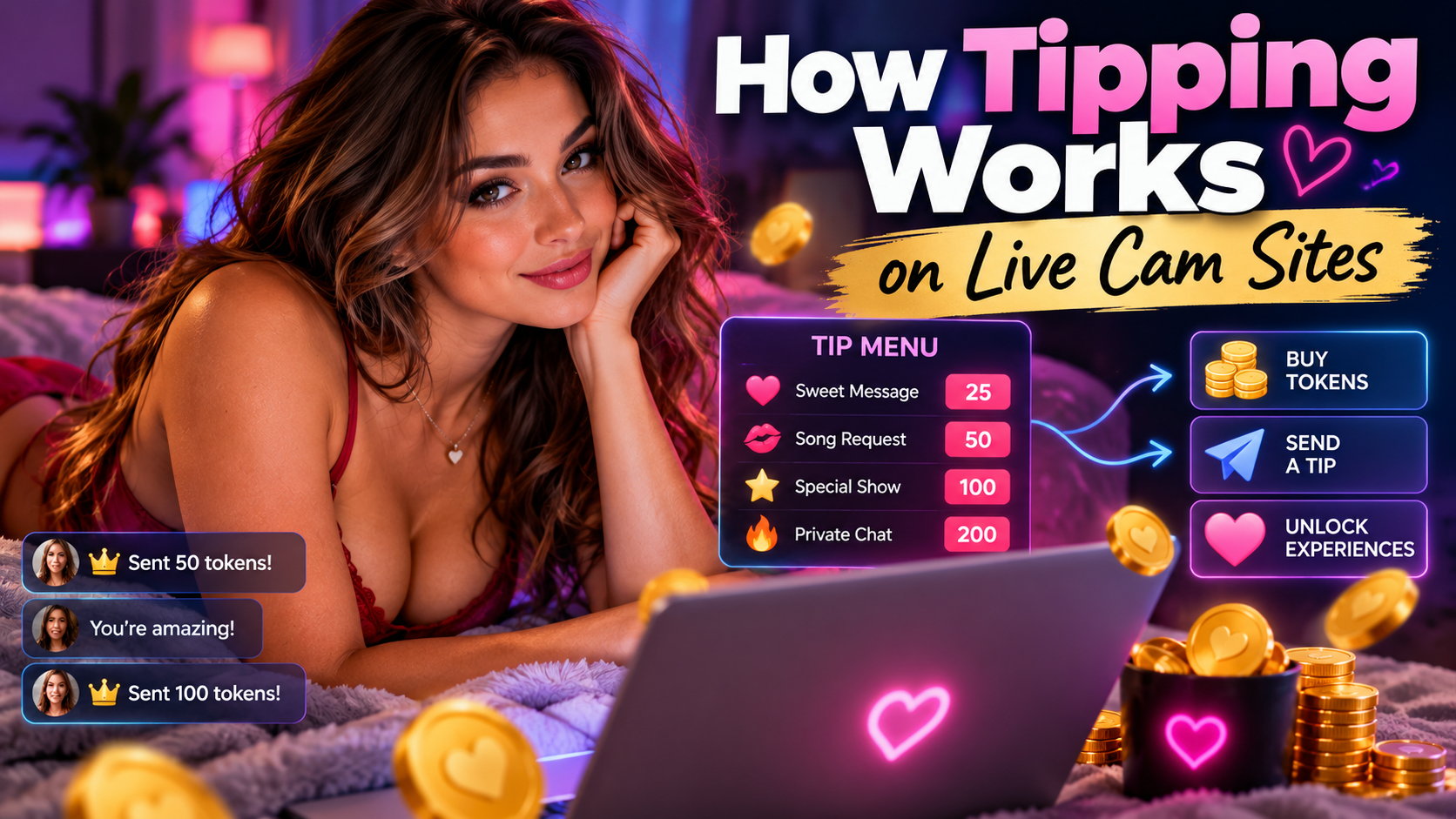
A tip menu generally lists specific options and their associated virtual-token or credit amounts. The menu helps viewers understand what is available without repeatedly asking the performer to explain every option.
A useful distinction is whether you're sending a voluntary appreciation tip or selecting a defined menu item. Those transactions may have different expectations.
Some platform guidance explicitly warns viewers not to send an unsolicited tip and then demand an unexpected service afterward.
Set a budget before entering paid chat
Paid interactions can become expensive when sessions are charged by the minute or involve repeated purchases of virtual credits.
Before participating, determine what you're comfortable spending and understand how the site's billing system works.
Check whether the displayed price is per minute, per session, or per action. Also look for any minimum purchase, recurring payment, or automatic renewal terms.
Never assume that spending more will guarantee a personal relationship, special attention, or an outcome that hasn't been clearly agreed upon.
When should you consider a private chat?
A private session may make sense when you want a more focused conversation and the performer offers that option. It can also be useful when public chat moves too quickly for meaningful interaction.
However, private access does not guarantee unlimited attention or unrestricted requests. The session remains subject to the performer's preferences and the platform's policies.
If you're interested in exploring different interactive formats, webcam chat experiences on Cams.com can provide a starting point for reviewing available rooms and features.
Common Cam Room Conversation Mistakes and How to Recover
Even experienced viewers occasionally say something awkward, misunderstand a room rule, or enter a conversation at the wrong moment. The difference between an uncomfortable mistake and an unpleasant interaction often comes down to how someone responds afterward.
Instead of trying to defend every message, recognize the situation, make a brief correction if needed, and move forward. A simple acknowledgment is usually more effective than a lengthy explanation.
Mistakes that can derail a conversation
Sending repeated greetings: Posting "hello" several times in quick succession can look like spam. Send one greeting and allow time for a response.
Asking too many questions: A string of unrelated questions can make the conversation feel like an interrogation. Focus on one subject at a time.
Making personal assumptions: Avoid assuming that a performer's friendly tone reflects romantic interest or personal availability.
Interrupting ongoing activities: Pay attention to whether the performer is actively chatting or concentrating on something else.
Comparing performers: Comments that rank one performer against another can make the conversation uncomfortable and unnecessarily competitive.
Complaining about money: If a feature exceeds your budget, choose another option instead of pressuring someone to lower their rates.
What to say after an awkward moment
If you realize that a message was inappropriate, a short apology is usually enough.
For example:
"Sorry, I didn't realize that was against your room rules. Won't happen again."
Then change the subject or allow the conversation to continue naturally.
Avoid repeatedly asking whether the performer is upset or demanding reassurance. That can place additional pressure on someone who is already managing a busy room.
If you have been muted or blocked, respect the decision. Don't create another account to bypass the restriction.
How to Start a Conversation With a Webcam Model Based on Room Atmosphere
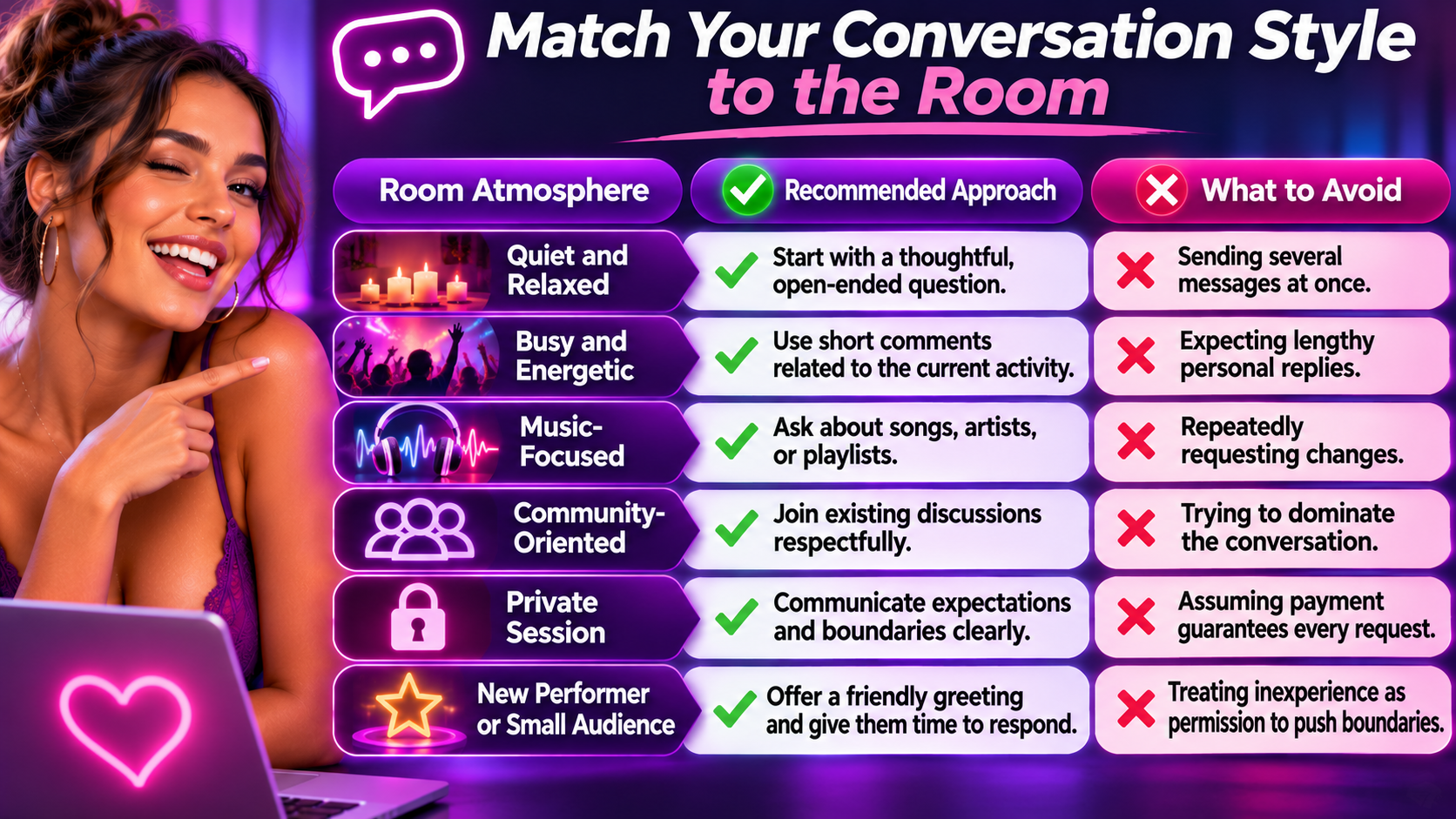
Not every cam room has the same personality. Some feel like lively social gatherings, while others are quieter, more structured, or centered around a particular activity. Choosing a room that matches your communication preferences can make starting conversations considerably easier.
Rather than trying to adapt to an environment where you feel uncomfortable, look for a setting that encourages the kind of interaction you enjoy. Someone who prefers relaxed conversation may have a better experience in a smaller, discussion-oriented room than in a crowded broadcast where messages disappear almost immediately.
Consider compatibility instead of chasing attention
A conversation can feel effortless with one performer and difficult with another. That doesn't necessarily mean either person is doing anything wrong.
Different communication styles, interests, languages, and personalities influence how comfortably people interact.
If a particular room doesn't feel like a good match, there is nothing wrong with moving on. Finding an environment where conversation happens naturally is usually more rewarding than repeatedly trying to win someone's attention.
Live Webcam Chat Safety: Protect Your Privacy While Having Fun
Live webcam conversations may feel spontaneous and personal, but they still take place on internet platforms where usernames, messages, transactions, and other activity may be visible or recorded by the service. Understanding basic digital safety is especially important when interacting with unfamiliar people.
The best approach is to enjoy conversations while keeping your personal information and financial boundaries separate from the experience. You can be friendly, engaging, and genuine without revealing identifying details or moving communication to an unfamiliar service.
Keep personal details private
Choose a username that doesn't reveal your full legal name, workplace, or other identifying information. Be cautious about sharing your phone number, email address, home address, or personal social media accounts.
Also remember that public chat messages may be visible to other participants, not just the performer.
Even when a conversation feels private, avoid sharing information you would be uncomfortable having stored or disclosed.
Be cautious about off-platform requests
If someone asks you to move to an unfamiliar website, send money through an unrelated payment service, or share sensitive information, consider the risks before proceeding.
Staying within a platform's supported communication and payment systems can provide clearer transaction records and access to its reporting and support mechanisms.
Never assume that an outside payment or communication channel offers the same protections.
Protect your camera and microphone
If a service offers two-way video or audio, review the permissions before enabling either feature.
Check what your camera can reveal about your surroundings, including photographs, documents, location clues, and other people who may be nearby.
Only activate video or audio when you understand how the feature works and feel comfortable participating. Never record or redistribute another person's broadcast without permission and authorization under the applicable rules.
Know when to leave a conversation
If someone pressures you to spend more than you intended, share personal information, or participate in an interaction that makes you uncomfortable, you can end the conversation.
You don't need to justify your decision or continue negotiating.
For adults interested in broader online communities, adult friendfinder is another platform associated with adult social connections. As with any online service, review its privacy settings, community rules, and communication features before participating.
Your First Five Minutes in a Cam Room: A Simple Beginner's Plan
Knowing the etiquette is helpful, but putting it into practice is what builds confidence. Beginners often overthink their first interaction because they feel they need to be funny, memorable, or especially interesting. In reality, a comfortable first experience can be as simple as exchanging a few friendly messages.
This five-minute approach gives you a practical way to participate without rushing into personal questions, paid features, or complicated conversations. The times are suggestions rather than strict rules; adjust your pace to whatever is happening in the room.
1. Minute 1: Observe
Check the room topic, posted rules, and current conversation. See whether the performer is welcoming new participants or focused on another activity.
2. Minute 2: Say hello
Send a simple greeting such as "Hey, first time here! How's your day going?" Don't follow it immediately with additional messages.
3. Minute 3: Find a shared topic
If the performer responds, ask one relevant question about something they've mentioned or something happening in the broadcast
.
4. Minute 4: Let the exchange develop
Respond naturally, acknowledge their answer, and avoid switching topics too quickly. If they don't reply, give them space.
5. Minute 5: Decide what feels comfortable
Continue chatting, watch quietly, or leave with a friendly goodbye. There's no obligation to spend money or extend the conversation.
How to tell whether your first conversation went well
A positive interaction doesn't need to last a long time. You might exchange only two or three messages and still have an enjoyable experience.
Look for simple signs: the exchange felt comfortable, you respected the room's expectations, and you didn't feel pressured to do something you hadn't planned.
Over time, you'll become better at recognizing which conversation styles and environments suit you.
What to Remember Before Your Next Cam Room Conversation
Learning how to start a conversation in a cam room is less about finding the perfect opening line and more about approaching another person with curiosity, patience, and respect. A simple greeting, a relevant question, and a willingness to listen can create a better experience than an elaborate introduction. The most important skill is recognizing that good conversation is shared rather than forced.
Understanding the environment is equally important. Public chat rooms, private sessions, tipping rooms, and group experiences create different expectations. Taking a moment to read the rules, observe the activity, and understand available features helps you avoid unnecessary misunderstandings. When you know what type of interaction you're entering, it's easier to participate confidently and comfortably.
Remember that cam performers are people working in an interactive entertainment environment. Their friendliness deserves the same respect as anyone else's, but it shouldn't be mistaken for a promise of personal attention or intimacy. Respect boundaries, accept unanswered questions, and recognize that financial contributions do not override consent. These habits make the experience more enjoyable for both performers and viewers.
Finally, give yourself permission to learn gradually. You don't need to become the most active person in a room or master every feature during your first visit. Start with a greeting, explore a conversation when the opportunity feels natural, and find communities that match your interests. With a little experience, you'll discover that the best live cam conversations aren't necessarily the longest or most elaborate. They're the ones where everyone feels comfortable participating.
Additional FAQs: Starting a Conversation in a Cam Room?
Can you chat with cam models without creating an account?
Some live cam sites allow visitors to watch public broadcasts without registering, but sending messages may require a free account. Other platforms offer limited guest participation. Check the chat permissions before joining, since viewing a stream and participating in its conversation are not always the same feature.
Why can't I send messages in a live cam room?
You may be unable to send messages because the room requires registration, your account lacks the necessary permissions, or the performer has restricted public chat. Some rooms also use temporary slow-mode settings or moderator controls. Check for account verification requirements, chat restrictions, or notifications explaining why messaging is unavailable.
Can cam models see who is watching their live stream?
Depending on the platform, performers may see usernames, viewer counts, or lists of registered participants. However, that doesn't necessarily mean they can identify everyone watching. Some viewers may appear anonymously or as guests. Review the platform's privacy settings to understand what information is visible when you enter a room.
Can you send private messages to a cam model during a public show?
Some cam platforms support private messaging while a public broadcast continues, although the feature may require payment, special permissions, or the performer's approval. Not every performer accepts private messages during a show. If private messaging is unavailable, use public chat appropriately rather than repeatedly requesting individual attention.
What does it mean when a cam model mentions your username?
When a cam model mentions your username, they're usually acknowledging your presence, responding to something you've written, or thanking you for participating. It's a common way to make live conversations feel interactive. Although personalized greetings can be enjoyable, they shouldn't automatically be interpreted as romantic interest or an invitation to communicate outside the platform.
How do you know if a cam model is comfortable talking to you?
Look for conversational cues such as voluntary responses, follow-up questions, and continued engagement with your chosen topic. Short replies, changes of subject, or clearly stated boundaries may indicate that the performer prefers a different interaction. No single response proves someone's feelings, so the most reliable approach is to respect what they communicate.
Can you use emojis and reactions when chatting with webcam models?
Yes, emojis and reactions can make live webcam conversations more expressive when used appropriately. A smile, wave, or laughing emoji can communicate friendliness without interrupting the discussion. Avoid sending excessive emojis, repeating the same reaction, or using symbols that could be interpreted as inappropriate. The goal is to complement the conversation rather than overwhelm it.
What should you do if you don't speak the same language as a cam model?
Start with a short greeting in a language the performer appears comfortable using. Keep your sentences simple and avoid slang, complicated jokes, or expressions that may translate poorly. If the platform provides translation tools, they may help with basic communication. Be patient with misunderstandings and don't assume the performer is obligated to communicate in your preferred language.
Can you become friends with a cam model through regular conversations?
Regular conversations can create familiarity and a friendly atmosphere, but a performer's professional interactions should not automatically be interpreted as a personal friendship. Genuine friendship requires mutual interest and freely chosen boundaries. Enjoy the conversations without expecting private contact, special treatment, or a relationship beyond the platform.
How do you end a conversation with a cam model politely?
A simple goodbye is usually enough. You might say, "Thanks for the chat, I enjoyed talking with you," or "Have a great rest of your stream!" You don't need an elaborate explanation for leaving. Ending conversations courteously helps maintain a positive atmosphere and makes future interactions feel more comfortable.
Recent Articles